
Do I Need a Domain for Business Email? A Straight Answer
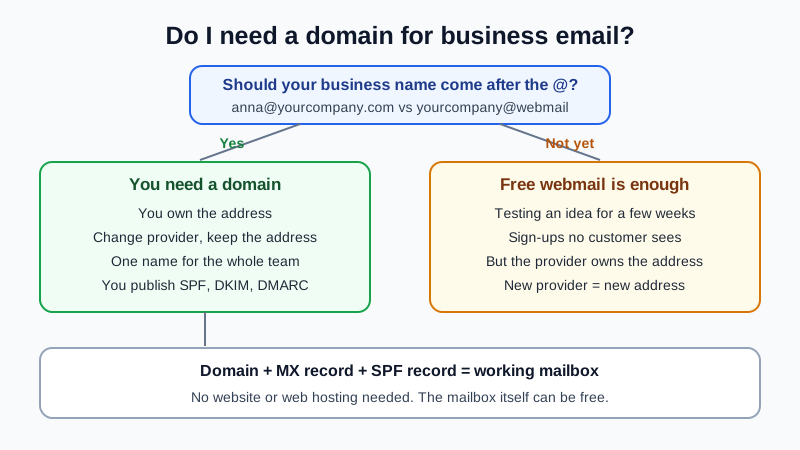
Yes, if by business email you mean an address on your own domain, like anna at yourcompany.com, where yourcompany.com is your domain, so you need one. You do not need a website, web hosting or an expensive suite. A domain is a yearly registration you buy from a registrar, and the mailbox itself can be free. If you are happy with a free Gmail address with your company name in it, you need no domain at all, and for a hobby or a first test of an idea that is fine. The trade-off is ownership: a domain address belongs to you and moves with you between email providers; a free webmail address belongs to the provider.
This guide helps you decide, with a side-by-side table, the cases where a free webmail address is enough, and what the setup involves once you have a domain. For the definition of the term itself, see what a custom domain email is.
Domain address vs free webmail address
| Question | Address at yourcompany.com (own domain) | Address at gmail.com (no domain) |
|---|---|---|
| Who owns the address? | You, as long as you renew the domain | The webmail provider; your account follows its terms |
| Can you change email provider and keep the address? | Yes: change two DNS records and move the mail | No: a new provider means a new address |
| Does it match your website and invoices? | Yes, one name everywhere | No, the provider's name sits after the @ |
| Can you add colleagues on the same name? | Yes: anna@, ben@, invoices@ on one domain | Each person signs up for an unrelated address |
| Can you protect the name against spoofing? | Yes: you publish SPF, DKIM and DMARC for your domain | Only the provider controls its domain's records |
| What does it cost? | A yearly domain fee; mailboxes can be free | Nothing |
| What can go wrong? | Forgetting to renew the domain stops mail | Losing access to the account loses the address for good |
When a free webmail address is enough
Not everyone needs a domain on day one. A free address is a sensible choice when:
- You are testing an idea for a few weeks and have not chosen a name yet. Buying a domain for a name you may drop is wasted effort.
- The address is only for sign-ups and receipts that no customer will see.
- It is a personal side activity with no invoices, contracts or staff.
Even then, pick the name you would want on a domain later and check that the domain is still available. Switching later is easy on the mail side, but every customer, supplier and online account that knows your old address has to be told.
When you should get a domain
- You send invoices or quotes. Invoice scammers often write from free webmail or look-alike addresses, so customers are right to be wary of payment requests that do not come from the supplier's own domain. Our guide to invoice fraud by email shows why a stable, verifiable sender matters.
- More than one person answers mail. A domain gives each person their own mailbox on the same name, plus role addresses such as info@ or orders@.
- You have, or will have, a website. Your site name and your email name should match; people check.
- You want to keep the address for years. With a domain, the address survives a change of provider, a change of staff and a provider shutting down a free service.
What "getting a domain" actually involves
- Choose the name. Short, easy to spell over the phone, the same as your business or your own name. A common extension like .com or your country's extension is easiest for people to remember.
- Register it at a registrar. This is a yearly fee paid to the registrar. Turn on auto-renew so the domain never lapses; what happens when a domain expires explains why that matters for email.
- Pick an email host. The domain alone does not give you a mailbox. Some registrars bundle forwarding or a short mailbox trial; free email with a domain purchase compares what they include.
- Publish two DNS records. At the place that runs your domain's DNS, add an MX record (my.mailbux.com, priority 10) and an SPF TXT record (
v=spf1 include:msg25.com ~all). DKIM is optional and improves deliverability; the values are under Domains → Open DNS setup. Your website, if you have one, keeps running. - Create the mailboxes and test. Send a message in and out before you print the address anywhere.
Step by step, from a fresh domain to a working mailbox, is in I bought a domain, how do I get email on it?. If your domain sits at a site builder, there are dedicated guides such as free email for a Wix domain.
Do you need a website or hosting too?
No. Email only needs the domain and two DNS records. Many businesses have email on a domain that shows no website at all, or a parked page. Custom domain email without a website covers that case. If you add a website later, its records live next to the mail records and do not disturb them.
Can the mailbox really be free?
Yes. The Mailbux Free plan is free forever: 7 GB of shared storage, 1 domain, webmail, the Mailbux apps and SMTP sending, and outgoing mail carries a small "Sent via Mailbux" footer. The Free plan includes up to 7 business mailboxes, so a small team can start on it; setting up free email for several people shows how. On Free you read and send mail in Mailbux webmail and the Mailbux apps; standard IMAP and POP3 access for clients like Outlook or Apple Mail is available on paid plans. For how free options compare, read the free business email account guide.
Frequently Asked Questions
Can I have business email without buying a domain?
You can have an email address for your business without a domain, such as a free webmail address. An address that carries your business name after the @ always needs a domain you register.
Do I need to move my domain to my email provider?
No. The domain can stay at any registrar. Only the MX and SPF records change, wherever your DNS is managed.
Does buying a domain give me an email address automatically?
Usually not a full mailbox. Some registrars include email forwarding or a time-limited mailbox trial; a lasting mailbox comes from an email host.
Can I change domains later?
Yes, but your address changes with it, so customers and online accounts need the new one. Choosing the long-term name at the start saves that work.
Is a domain address more trusted than a Gmail address?
For business mail, usually yes: it matches your website and invoices, and you can publish SPF, DKIM and DMARC that let receivers check mail really came from you.
Get your domain working
With Mailbux you get email on your own domain, DNS values with copy buttons under Domains → Open DNS setup, DKIM signing for better deliverability, two-factor sign-in and app passwords, plus webmail and the Mailbux apps. Compare the plans and start with the one that fits.