
Invoice Fraud: What to Do When a Supplier Emails New Bank Details
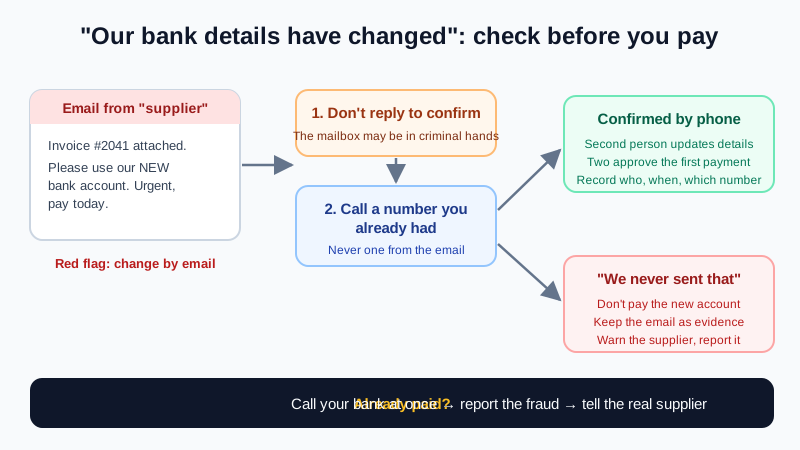
An email arrives from a supplier you pay every month. The tone is normal, the invoice looks right, and there is one small line: "Please note our bank details have changed. Use the new account below for this and all future payments." This is one of the most costly email scams a business can meet, and it works because nothing about it looks unusual.
This guide is for the side that pays: finance teams, office managers and small business owners. It explains how the scam works, the red flags, a simple check that stops it, and what to do quickly if money has already gone.
How the "new bank details" scam works
Security teams call it invoice fraud or business email compromise (BEC). The criminal wants one thing: for you to send a real payment to their account instead of your supplier's. They usually get there in one of two ways:
- The supplier's mailbox was taken over. The message really comes from your supplier's address, often as a reply in a real email thread about a real invoice. The amounts and names are right because the criminal has read the earlier mail.
- A look-alike address. The message comes from a domain that is one letter off (
acme-supplies.coinstead ofacmesupplies.co.uk), or a free mailbox with the supplier's name as the display name. Some send from the real thread but quietly set a different reply-to address.
The scale is large. The FBI's Internet Crime Complaint Center (IC3) counted more than 305,000 BEC incidents worldwide between October 2013 and December 2023, with exposed losses of about $55.5 billion, and reported cases in all 50 US states and 186 countries.
Red flags in the email
Any one of these is a reason to stop and check before paying:
- Any change of bank details by email. Treat this as the main red flag, even when everything else looks perfect.
- Urgency or secrecy. "Payment is overdue", "please process today", "our accountant is on holiday, reply only by email".
- A reason you can't easily check. "We are being audited", "our old bank account is frozen", "we changed banks after a merger".
- A new account in another name or another country than the supplier you know.
- The sender address or reply-to is slightly different from earlier messages. Tap or click the sender name to see the full address, and press Reply to see where your answer would really go.
- The PDF invoice is subtly edited: a different font in the bank box, a changed logo, or the invoice arrives as a link instead of an attachment.
Our guide on reading email headers to spot a forged email shows how to check where a message really came from. But a perfect header doesn't prove the request is real: if the supplier's mailbox was hacked, the email really did come from them.
The one check that stops it: call back on a number you already have
Email alone can never prove a change of bank details. The fix is a process, not a tool:
- Don't reply to the email to confirm. If the mailbox is in criminal hands, the "yes, that's right" comes from them.
- Phone the supplier on a number you had before this email: from your supplier records, an old invoice, a signed contract or their official website you typed in yourself. Never use a phone number, link or contact name from the message that asked for the change.
- Speak to someone you know and ask them to read the new account details to you, rather than you reading them out for a "yes".
- Use your bank's payee name check where it exists. Many banks show whether the account name matches the payee you typed. A "no match" warning is a reason to stop.
- Record the check: who you called, on which number, when, and what they confirmed.
- Consider a small test payment for large amounts, then ask the supplier by phone to confirm it arrived.
Write it into your payment process
Scams succeed when one busy person decides alone under time pressure. A short written rule protects everyone:
- No change to supplier bank details is made from an email, ever. A call-back to a known number is required, by someone other than the person who received the request.
- Changes are made by a second person, and the first payment to new details needs two people to approve it.
- Urgent requests from a manager or director to pay a new account get the same check. "The CEO said so by email" is a common variant of the same scam.
- Staff are told it is always fine to delay a payment to check, and that nobody will be blamed for asking.
- Suppliers are told how you handle changes, so a real supplier expects your call.
Protect your own mailboxes too
Criminals also read finance mailboxes to learn who pays whom and when. Basic hygiene makes your side harder to use:
- Use a unique password for every mailbox and turn on two-factor authentication.
- Check now and then for forwarding rules and filters you didn't create, especially rules that move messages containing words like "invoice" or "payment". Our hacked business email recovery steps show where to look.
- Read links before you click them. The guide to checking a link before clicking covers fake sign-in pages that steal mailbox passwords.
- Publish SPF, DKIM and DMARC for your own domain, so criminals can't easily send mail that looks like it comes from you to your customers. See how to stop email spoofing of your domain.
If you already paid
Time matters more than anything else. Act in this order:
- Call your bank at once on the number from your card or the bank's official site. Say it was a fraudulent transfer and ask them to recall the payment. The sooner it is reported, the better the chance of stopping the money.
- Report it to the police or your national fraud reporting service. In the US, the FBI asks victims to file a complaint at ic3.gov as soon as possible, whatever the amount. Other countries have their own fraud reporting services.
- Tell the real supplier, by phone on a number you already had. Their mailbox may be compromised and other customers may be targeted.
- Keep the evidence: don't delete the emails. Save them with full headers, plus the invoice files and payment records.
- Check your own mailboxes for signs of a takeover, in case the criminal learned about the payment from your side.
Quick checklist
- A change of bank details by email is a red flag, always.
- Never confirm by replying to the same email.
- Call back on a number you already had, and let them read the details to you.
- Two people for any new payee or changed details.
- Paid by mistake? Bank first, then the fraud report, then the supplier.
Professional email on your own domain
Mailbux gives your team email on your own domain with webmail and mobile apps, inbox filters, two-factor authentication and app passwords for every device, and copy-and-paste SPF, DKIM and DMARC values under Domains → Open DNS setup so others can't easily fake your domain. Compare the options on our pricing page.