
Free Email With Domain Purchase: What Registrars Include
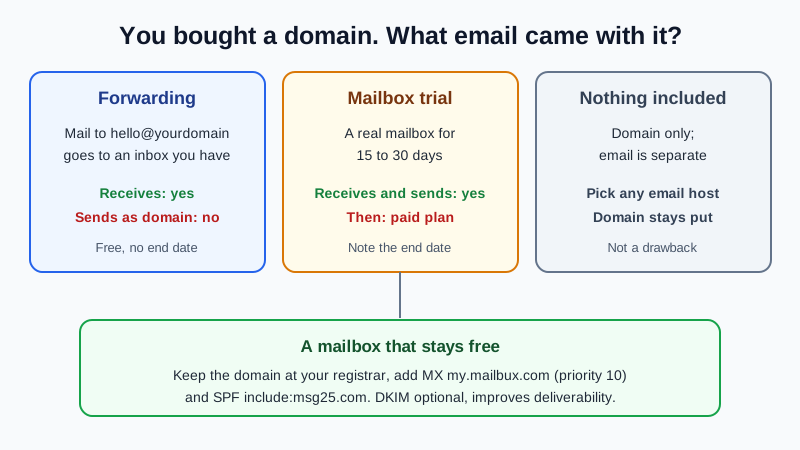
Most registrars do not include a lasting free mailbox when you buy a domain. What you usually get is one of three things: free email forwarding (mail to you@yourdomain is passed on to an inbox you already have, but you cannot send as that address), a mailbox trial that ends after 15 or 30 days and then becomes a paid plan, or nothing at all. A free mailbox that sends and receives as your domain comes from an email host instead, and you connect it with two DNS records. The table below shows what each registrar offers, checked on their own websites on 11 November 2026.
Why this matters: a forwarding address looks like business email until you reply, and a trial looks free until the renewal date. Knowing which one you have saves you a surprise later.
What registrars include with a domain (checked 11 November 2026)
| Registrar | What is free | Can you send as your domain? | Mailbox offer |
|---|---|---|---|
| Porkbun | Email forwarding, 20 addresses | No (forwarding only) | Porkbun Email: "FREE 15 day trial w/domain", then paid |
| Namecheap | Email forwarding, up to 100 addresses | No: Namecheap says forwarding does not allow sending outgoing mail | Private Email: 30-day free trial that converts to an annual plan |
| Cloudflare Registrar | Email Routing (custom addresses forwarded to any inbox) | No (receive and forward) | No mailbox product |
| Squarespace Domains | Email forwarding | No (forwarding only) | Google Workspace, paid |
| Gandi | Email forwarding and aliases | No: Gandi says forwarding addresses cannot send | Paid mailboxes; free mailboxes ended 30 November 2023 |
| Dynadot | Email forwarding (listed with its free DNS management) | No (forwarding only) | Separate email product |
| Name.com | No free email confirmed on its site | Only during the trial | Titan Email: free trial that converts to a yearly plan after 30 days |
| Hover | Nothing: "Hover doesn't provide free email service" | No | Paid mailboxes; forwarding is also a paid feature |
| Wix | Nothing: a Premium site plan "does not include a business email" | No | Google Workspace, paid |
Offers change, so check the registrar's own page before you buy. We list only offers we could confirm on each registrar's own site on the date above; prices are left out on purpose. Hosting companies that include email with a web hosting plan are a different deal: the mail is tied to the hosting, not to the domain.
The three kinds of "free email" explained
1. Email forwarding
You create addresses such as hello and sales at yourdomain.com, and every message to them is passed on to a Gmail or other inbox. It is genuinely free and fine for receiving. The catch is replies: they go out from your personal address, so customers see two different names, and forwarded mail can fail sender checks at some receivers. Forwarding and a real mailbox also cannot both run on the same domain, because both need the domain's MX records. Switching from forwarding to a real mailbox walks through the change.
2. A mailbox trial
A real mailbox that sends and receives, free for a set period. Several registrars state that the trial converts to a paid plan at the end. Before you start one, note three things: the end date, whether it renews automatically, and how you would get your mail out if you do not continue. Moving mail out later is possible, but it is easier to start on a mailbox you intend to keep.
3. Nothing included
Some registrars sell domains only and leave email to you. That is not a drawback: the domain and the mailbox are separate services anyway, so you are free to choose any email host and keep the domain where it is.
How to get a mailbox that stays free
- Keep the domain where it is. There is no need to transfer it; every registrar in the table lets you edit DNS records.
- Sign up for a free email host and add the domain. In Mailbux: Services, your plan, Manage, Domains, Add domain. Then create mailboxes under Manage → Mailboxes.
- Turn off what the registrar set up for mail. Remove forwarding rules and any trial mailbox records first, so their MX records can go.
- Add two records. MX
my.mailbux.comwith priority 10, and SPF as a TXT record:v=spf1 include:msg25.com ~all. DKIM is optional and improves deliverability; copy it from Domains → Open DNS setup. - Test. Send a message in from a personal address and reply from webmail. If your website runs on the same domain it is not affected; email without changing nameservers explains why.
Registrar-specific screens are in our guides for Namecheap, Cloudflare, Squarespace, GoDaddy and Wix.
What the Mailbux Free plan includes
The Free plan is free forever: 7 GB of shared storage, 1 domain, webmail, the Mailbux apps and SMTP sending, and outgoing mail carries a small "Sent via Mailbux" footer. The Free plan includes up to 7 business mailboxes. On Free you read and send mail in Mailbux webmail and the Mailbux apps; standard IMAP and POP3 access for clients like Outlook or Apple Mail is available on paid plans. There is no trial end date. For a wider comparison of free options, see the free business email account guide, and if you are still deciding whether to buy a domain at all, read do I need a domain for business email?
Frequently Asked Questions
Does buying a domain come with a free email address?
Usually you get forwarding or a short mailbox trial, not a lasting mailbox. Forwarding receives mail for your domain but cannot send as it.
Is free email forwarding enough for a business?
For receiving, sometimes. For replying to customers it falls short, because replies leave from your personal address. A mailbox on your domain fixes that.
What happens when a registrar's email trial ends?
The registrars we checked say the trial converts to a paid plan. If you do not want that, cancel before the end date and move your mail and MX records first.
Do I have to transfer my domain to get free email elsewhere?
No. You only change the MX and SPF records at the registrar. The domain registration stays where it is.
Can I use registrar forwarding and a mailbox together?
Not on the same domain, because both need the domain's MX records. Recreate forwarded addresses as mailboxes or aliases at your email host.
Sources, checked 11 November 2026: porkbun.com/products/email; Namecheap Knowledgebase "How to set up free email forwarding" and namecheap.com/hosting/email; cloudflare.com/products/email-routing; domains.squarespace.com; Gandi News "FAQ – new mailbox offer" (June 2023) and gandi.net/en/domain; dynadot.com/domain; name.com/titan-email; Hover Help "Email forwarding with Hover Webmail"; Wix Help Center "Business Email: An Overview".
Email that stays on your domain
Mailbux gives you mailboxes that send and receive as your own domain, DNS values with copy buttons under Domains → Open DNS setup, DKIM signing, two-factor sign-in and app passwords, webmail and the Mailbux apps. See the plans and pick the one that fits your team.