
What Is a PTR Record (Reverse DNS) and Does Your Business Email Need One?
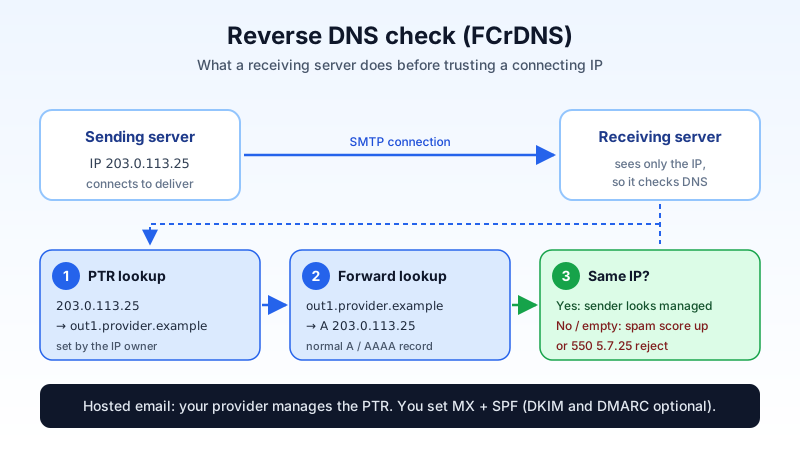
If a bounce message ever told you a server "has no reverse DNS" or "PTR record missing", you have met one of the oldest checks on the internet. This guide explains what a PTR record is, why receiving servers care, who is actually responsible for it, and when you, as a business owner with a custom domain, need to do anything at all. Short answer: if your mail goes out through a hosted email provider, usually nothing.
What a PTR record is
Normal DNS works forwards: you look up a name such as mail.example.com and get back an IP address. A PTR (pointer) record works in reverse: you look up an IP address and get back a host name. That is why it is called reverse DNS or rDNS.
Reverse lookups live in a special zone. For the IPv4 address 203.0.113.25, the PTR record sits at 25.113.0.203.in-addr.arpa (the address written backwards). IPv6 uses ip6.arpa in the same way, one hex digit at a time.
Why receiving servers check it
When a server connects to deliver a message, the receiving side sees only its IP address. Before trusting the message, many receivers run a quick check called forward-confirmed reverse DNS (FCrDNS):
- Look up the PTR record of the connecting IP. Example result:
out1.provider.example. - Look up that name forwards (A or AAAA record).
- Check that it points back to the same IP.
If step 1 returns nothing, or the name does not point back, the sender looks like a home connection or a hastily set-up machine, which is exactly what spam botnets use. Some large mailbox providers reject such mail outright; others score it as more likely to be spam. A generic name such as 203-0-113-25.dynamic.isp.example is also treated with suspicion, even though it technically exists.
PTR is one signal among several. It does not replace SPF, DKIM or DMARC; it simply proves that whoever runs the sending IP set it up deliberately. For how the other three work together, see SPF, DKIM and DMARC explained.
Who controls a PTR record (not your domain registrar)
This is the part that confuses most people. You cannot add a PTR record in the DNS panel where you manage MX, SPF and other records for your domain. The reverse zone belongs to whoever owns the IP address: a hosting company, a cloud provider or an internet service provider. Only they, or a customer they delegate it to, can set it.
So the PTR record that matters for your email is the one on the IP address that actually sends your mail, and that depends on how you send:
| How your mail is sent | Whose PTR counts | What you do |
|---|---|---|
| Hosted business email (you send through your provider's servers) | The provider's sending IPs | Nothing. The provider manages it. |
| Your own mail server on a rented server or cloud machine | Your server's IP | Set the PTR in your hosting provider's control panel or ask their support. |
| Office server or device on a business internet line | Your ISP's IP | Ask the ISP for a static IP with a custom PTR, or relay the mail through a proper provider instead. |
| A website, CRM or printer sending directly | Whatever server it connects from | Better: make it send through your mailbox over authenticated SMTP. |
Do you need to do anything with Mailbux?
No. When you send from a Mailbux mailbox, whether from webmail, the mobile app, Outlook or any client using authenticated SMTP, your mail leaves through our outbound servers. Those already have matching forward and reverse DNS, and we keep them that way. You do not create, request or change any PTR record for your domain.
What you do set in your own DNS is the short list from our setup guide:
- MX:
my.mailbux.comwith priority10(required). - SPF: a TXT record that includes
include:msg25.com(required). - DKIM and DMARC: optional, but they improve deliverability. The exact values for your domain are in your dashboard under Manage → DNS.
The full walkthrough is in DNS records for business email: MX, SPF, DKIM and DMARC.
How to check a PTR record yourself
Useful when you run your own server, or when a bounce mentions reverse DNS and you want to see which IP it is talking about.
- Find the sending IP. Open the bounce or a delivered message and view the full headers. The bottom-most
Received:line written by a server outside your network shows the IP that connected. - Look up the PTR. On macOS or Linux:
dig -x 203.0.113.25 +short. On Windows:nslookup 203.0.113.25. You should get a host name back. - Confirm it forwards. Run
dig +short out1.provider.example(ornslookupwith the name) and check that the same IP appears.
If step 2 is empty or step 3 does not match, that IP fails FCrDNS. If it is your own server, fix it with whoever owns the IP. If it is a third-party app sending as your domain, the cleaner fix is usually to route that app through your mailbox instead.
Common PTR-related bounces and what they mean
550 5.7.25"The IP address sending this message does not have a PTR record setup": the connecting IP has no reverse DNS at all.450 4.7.1"Client host rejected: cannot find your hostname": temporary rejection because the PTR lookup failed or did not confirm. The sender may retry, but it will keep failing until DNS is fixed.- "Reverse DNS does not match SMTP banner" (usually a warning, not a rejection): the name the server announces in its greeting differs from its PTR. Good practice is to make them match.
More codes and fixes are in SMTP 550 bounce codes explained.
When a PTR bounce shows up even though you use hosted email
If you send from a hosted mailbox and still see a PTR complaint, the message almost certainly did not go through your mailbox. Typical causes:
- A contact form, shop plugin or CRM sending directly from a web server.
- A scanner or printer sending straight to the internet from your office line.
- An old mail server or a previous provider that still sends for one department.
The fix is the same in each case: point that system at authenticated SMTP on your real mailbox, so its mail leaves from properly configured servers, passes SPF, and can be signed with DKIM. While you are at it, the checklist in our deliverability guide covers the other common reasons mail lands in spam.
Key points
- A PTR record maps an IP address back to a host name; receivers use it to spot unmanaged senders.
- It is controlled by whoever owns the sending IP, not by your domain's DNS panel.
- With hosted business email, the provider handles it. Your job is MX, SPF and, ideally, DKIM and DMARC.
- A PTR bounce on hosted email usually means some app or device is sending around your mailbox.
Business email where the sending side is handled for you
Mailbux gives you business email on your own domain with unlimited business mailboxes (each mailbox uses at least 1 GB of plan storage), authenticated SMTP for your apps and devices, and the DNS values for your domain in one place under Manage → DNS. Your mail is hosted on servers in the EU, US and Canada. You can start on the Free plan with up to 7 mailboxes and upgrade when you need more.