
Someone Is Sending Email From My Domain: How to Stop Email Spoofing
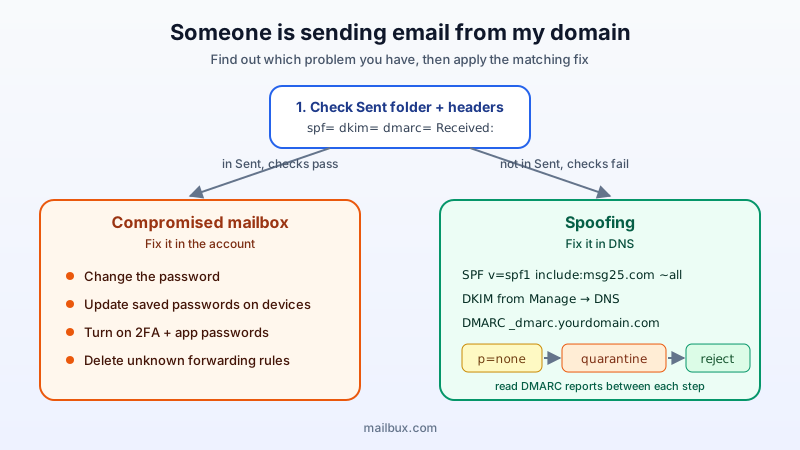
A customer forwards you an invoice "from you" that you never sent. Your inbox fills with bounce messages for emails nobody on your team wrote. A supplier asks why you suddenly changed your bank details. All three point to the same question: is someone sending email from my domain?
This guide walks through what is actually happening, how to tell spoofing apart from a hacked mailbox, and the exact steps that stop forged mail from reaching inboxes.
Two very different problems that look the same
When mail appears to come from your domain without your knowledge, there are two possible causes, and the fix is different for each:
- Spoofing: a stranger's server puts your address in the From line. They never logged in to anything of yours. Email was designed in an era of trust, so the From line can be typed freely, much like the return address on a paper envelope.
- A compromised mailbox: someone has the password of a real mailbox on your domain and is sending through your actual account. This mail is genuinely yours from a technical point of view, so it passes every authentication check.
Spoofing is fixed in DNS. A compromised mailbox is fixed in the account itself. Work out which one you have before changing anything.
Step 1: Check the Sent folder and the message headers
Start with the cheapest test. Open the mailbox the messages claim to come from and look in Sent. If the suspicious messages are there, or if you find unknown forwarding rules or filters, treat it as a compromised account and jump to Step 2.
If Sent is clean, ask the recipient to send you the full headers of one forged message (in most mail apps: "Show original" or "View source"). Three lines tell you most of the story:
Authentication-Resultsshows whether the message passedspf=,dkim=anddmarc=checks. Forged mail usually showsspf=failorsoftfail, no valid DKIM signature for your domain, anddmarc=fail.Return-Pathoften belongs to a completely different domain.- The lowest
Received:line shows the server that first handled the message. If it is not your email provider, the message did not come from your account.
Failing checks plus a foreign sending server means spoofing. Passing checks plus your own provider in the Received lines means the mail really left one of your accounts.
Step 2: If a mailbox is compromised, lock it down first
Do this before touching DNS, because authentication records cannot stop mail that is sent through your own account:
- Change the password of the affected mailbox to a new, long, unique one.
- Update every device that uses that mailbox (phones, laptops, printers, website contact forms). Old saved passwords keep retrying and can trigger login blocks.
- Turn on two-factor authentication and use app passwords for mail apps. Our two-factor authentication guide shows how.
- Remove unknown forwarding rules and filters. Attackers often add a hidden rule that copies or deletes replies.
- Warn the people who received the messages, especially if payment details were mentioned. Ask them to confirm any bank change by phone.
Step 3: If it is spoofing, publish (and tighten) SPF, DKIM and DMARC
You cannot stop a stranger from typing your address. What you can do is publish rules in DNS that tell receiving servers how to recognise your real mail, and what to do with everything else. That is the job of three records. If you want the background first, read SPF, DKIM and DMARC explained.
SPF: list who may send for you
SPF is a single TXT record on your domain that names the servers allowed to send your mail. For a domain on Mailbux, the record is:
v=spf1 include:msg25.com ~all
If other services also send as your domain (a newsletter tool, a CRM, your website), they must be merged into the same record. A domain may only have one SPF record; two separate ones break SPF entirely. See how to merge multiple SPF records.
DKIM: sign your real mail
DKIM adds a cryptographic signature to every message you send. A forger cannot produce that signature because they do not have your private key. In Mailbux, the DKIM record for your domain is shown under Manage → DNS; copy its name and value into a TXT record at your DNS host. DKIM is optional for delivery to work, but it is what lets DMARC pass reliably and it improves deliverability.
DMARC: tell receivers to reject forgeries
DMARC is the record that actually stops spoofing. It tells receiving servers: "if a message claims to be from my domain and fails SPF and DKIM alignment, do this with it." It lives at _dmarc.yourdomain.com, and Mailbux shows a ready-made value under Manage → DNS.
The policy (p=) is what matters:
p=none: monitor only. Forged mail is still delivered, but you start receiving reports.p=quarantine: failing mail goes to spam.p=reject: failing mail is refused outright. This is the setting that ends spoofing of your exact domain at every receiver that honours DMARC, which today includes the large mailbox providers.
Step 4: Move to enforcement without blocking your own mail
Jumping straight to p=reject is tempting during an attack, but if a service you rely on (invoicing, booking, newsletters) sends as your domain and is not in SPF or signing with DKIM, its mail will be rejected too. A safe path:
- Week 1: publish DMARC with
p=noneand arua=address you actually read, for examplev=DMARC1; p=none; rua=mailto:[email protected]. - Read the reports. They list every server that sent mail as your domain and whether it passed. Our guide to reading DMARC aggregate reports explains the format. Add any legitimate sender you find to SPF or set up its DKIM.
- Week 2 to 3: switch to
p=quarantineonce your real senders all pass. - After that: switch to
p=reject.
If forged messages are actively hurting customers right now and you are certain that all your real mail goes through your email provider, you can shorten this to a few days. Just check the reports before the final step.
What about the flood of bounces?
When a spammer forges your address, the receiving servers that reject the mail sometimes send a bounce back to the address in the From line: you. This is called backscatter. It is annoying but harmless: it does not mean your mailbox was used. Once DMARC is at quarantine or reject, most receivers drop forged mail without bouncing, and the flood fades. Meanwhile, delete the bounces or filter them; do not reply to them.
Lookalike domains: the part DNS cannot fix
DMARC protects your exact domain. It cannot stop someone registering yourcompany-invoices.com or swapping an "l" for an "I". If the forged mail comes from a lookalike domain, the defences are human ones:
- Agree a rule with customers and suppliers that bank details are never changed by email alone.
- Report the lookalike domain to its registrar's abuse contact.
- Train your team to read the full sender address, not just the display name.
Quick checklist
- Sent folder clean and no unknown forwarding rules? If not, change the password, update devices, enable 2FA.
- Exactly one SPF record, including
include:msg25.comand every other service that sends as you. - DKIM record from Manage → DNS published at your DNS host.
- DMARC published, reports reviewed, then moved from
p=nonetop=quarantinetop=reject. - Customers told how to verify payment changes.
Business email that makes the right setup easy
Mailbux gives you business email on your own domain with unlimited business mailboxes (each mailbox uses at least 1 GB of plan storage), two-factor authentication with app passwords, and the SPF, DKIM and DMARC values for your domain in one place under Manage → DNS. Your mail is hosted on servers in the EU, US and Canada. See the plans on our pricing page.