
How to Get a Free Domain for Email (and Why It Rarely Stays Free)
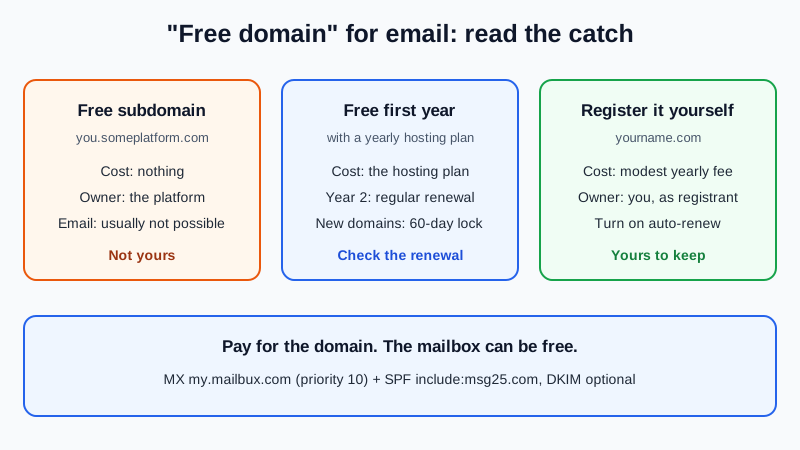
Short answer: a real domain you own for email is almost never free for good. A registered domain costs a modest yearly fee, and every "free domain" offer is either free for the first year only, a subdomain that belongs to someone else, or a student or promo deal with an end date. The cheapest honest route is to register a domain yourself, in your own name, and check the renewal price, not just the first-year price. The mailbox on top of it can be free, so the domain renewal is the only cost you can't avoid.
Still deciding whether you need a domain at all? Start with do I need a domain for business email?
Every "free domain" route, compared
| Route | Is the domain free? | Is it yours? | The catch |
|---|---|---|---|
| Free subdomain (yourname.someplatform.com) | Yes | No, the platform owns the parent domain | Usually no email, and it can vanish with the platform |
| Free country endings from Freenom (.tk, .ml, .ga, .cf, .gq) | Used to be | No longer on offer | No new registrations since 2023; long abuse history |
| "Free domain" with a hosting plan | First year only | Yes, if it is registered in your name | Needs a yearly plan; renews at the regular price |
| Student offers (GitHub Student Developer Pack) | Usually for one year | Yes | Only for verified students; renewal is paid |
| Domain registered by a web designer or agency "for free" | To you, at first | Often not | If it sits in their account, you depend on them |
| Register it yourself at a registrar | No, a modest yearly fee | Yes | Yearly renewal (use auto-renew) |
Why a free subdomain doesn't work for email
A subdomain is a name under someone else's domain, such as yourname.example-builder.com, and the owner of example-builder.com decides what happens to it. To receive mail, a domain needs its own MX record, and most free subdomain services don't let you add one. Even when they do, if the service closes or changes its terms, every address on it stops working and can't be moved.
The test: if you can't see the domain in your name in a registrar account, it isn't yours.
What happened to free .tk domains
For years, Freenom gave away domains on five country endings: .tk, .ml, .ga, .cf and .gq. In March 2023, after Meta sued it over abuse complaints, Freenom stopped allowing new registrations, KrebsOnSecurity reported. The report cites a 2021 study that put those five endings among the ten most abused by phishers.
That matters for email. Spam filters judge a sender partly by its domain, and an ending known for abuse can start with less trust. A common ending such as .com or your country's ending is the safer base.
"Free for the first year" with a hosting plan
This is the most common legitimate free domain. Hostinger's free domain page, checked 14 November 2026, is a typical example:
- The domain is free for the full first year when you buy an eligible hosting plan on a term of 12 months or longer. Its single-site plan and monthly plans don't include it.
- "After that first year it renews at the regular price."
- The domain is registered in your name, and you can move it to another registrar after the 60-day lock that applies to every new registration.
- Cancel within the 30-day money-back window and the domain fee comes out of your refund; the domain stays yours.
So the domain is free because you buy a year or more of hosting, which is a roundabout route if you only want email. If you take the deal, our page on free email for a Hostinger domain shows how to point that domain at a mailbox that stays free.
Student offers
If you are a student, the GitHub Student Developer Pack lists real domain offers. Checked 14 November 2026: one year of a .me domain from Namecheap, one .TECH domain free for one year, and a free Name.com domain on selected endings such as .live or .dev. Good for a personal or project address, but after the free period the domain costs the normal yearly fee, and if it lapses, the address goes with it.
The real cost, and what to check before you pay
A common ending costs a modest yearly fee, paid every year you want the address to work. Prices vary by registrar and ending, so check these instead:
- Renewal price, not the first-year price. A cheap first year with a higher renewal is the usual surprise.
- Who the registrant is. The legal holder of the domain should be you or your business, in an account you control.
- WHOIS privacy. Check whether it is included. It keeps your home address and phone number out of public lookups; Hostinger, for example, says it is included with its free domain.
- Transfer rules. Under ICANN rules a registrar may refuse to move a domain to another registrar in its first 60 days, and changing the registrant name or email can also start a 60-day lock.
- Expiry. An expired domain means no email, and later someone else may register it and get your mail.
Some registrars also add free forwarding or a short mailbox trial with the domain. Free email with a domain purchase compares what each one actually includes.
How to get a domain for email at the lowest honest cost
- Pick a name and a common ending. Short, easy to spell aloud, on .com or your country's ending.
- Compare the renewal price at two or three registrars, and check whether WHOIS privacy is included.
- Register it in your own account, with you as registrant. If someone helps, have them work inside your account.
- Turn on auto-renew and two-factor sign-in at the registrar, and use a recovery email that is not on the new domain.
- Add the domain to a free mailbox. At dash.mailbux.com, go to Manage, then Domains, choose Add domain, then create your address under Manage, then Mailboxes.
- Add two DNS records at the registrar: an MX record pointing to my.mailbux.com with priority 10, and an SPF TXT record
v=spf1 include:msg25.com ~all. DKIM is optional and improves deliverability (Domains, then Open DNS setup). Delete the registrar's default MX records. - Test it. Once the records show as found, send a message in and reply out.
For a fuller walkthrough of the first hour after buying, read I bought a domain, how do I get email on it?
Once you have the domain, the mailbox can be free
The Mailbux Free plan is free forever: 7 GB of shared storage, 1 domain, webmail, the Mailbux apps and SMTP sending, and outgoing mail carries a small "Sent via Mailbux" footer. The Free plan includes up to 7 business mailboxes. On Free you use Mailbux webmail and the Mailbux apps; standard IMAP and POP3 access for clients like Outlook or Apple Mail is available on paid plans. Compare the options in our guide to free business email accounts.
Frequently Asked Questions
Can I get a domain for email that is free forever?
Not one you own. Registered domains carry a yearly fee, free subdomains belong to the platform, and first-year deals renew at the normal price.
What happens when my free first year ends?
The domain renews at the regular price, or it expires if you don't pay. If it expires, email to it stops working, so turn on auto-renew or set a reminder well before the date.
Will a cheap or free domain ending hurt my email delivery?
It can. Endings with a long abuse history may start with less trust. A common ending plus SPF and DKIM gives your mail a better start.
Can I use a free subdomain for email?
Usually not. Most don't let you add the MX record email needs, and the address can disappear with the service.
Does the free mailbox add anything to my emails?
Yes. Outgoing mail on the Mailbux Free plan carries a small "Sent via Mailbux" footer.
Sources, checked 14 November 2026: KrebsOnSecurity, "Sued by Meta, Freenom Halts Domain Registrations" (March 2023); Hostinger, Free domain name page and FAQ; GitHub Education, Student Developer Pack; ICANN, "FAQs for Registrants: Transferring Your Domain Name".
Pay for the domain, not the mailbox
Mailbux gives you mailboxes on your own domain, DNS values with copy buttons, DKIM signing, two-factor sign-in, webmail and the Mailbux apps. Compare the plans and pick the one that fits.