
Is Google Workspace Free? What You Get Without Paying
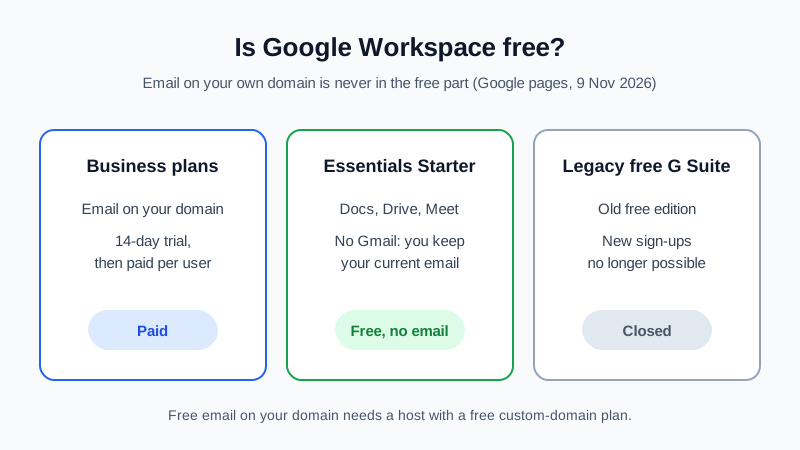
Short answer: no, not if you want Gmail on your own domain. Every Google Workspace edition that gives you an address like [email protected] (Business Starter, Business Standard, Business Plus and Enterprise) is a paid, per-user subscription. Google offers a 14-day no-cost trial of those plans, and that is the only free period. The one free edition, Essentials Starter, has no Gmail at all: you sign up with an email address you already have. Google's page for the old free G Suite edition says you can no longer sign up for it. All Google facts below come from Google's own pages, checked on 9 November 2026.
If what you need is free email on your own domain, that exists elsewhere, with its own limits. Below is what is and isn't free at Google, and where the free options are.
What Google Workspace offers for free, and what it doesn't
| Option | Cost (per Google, 9 Nov 2026) | Email on your own domain? | What to know |
|---|---|---|---|
| Business Starter / Standard / Plus | Paid per user per month; "No cost for 14 days" | Yes (Gmail) | Up to 300 users. After the trial you pay for every user. |
| Enterprise | Paid, through Google sales | Yes (Gmail) | For large organizations |
| Essentials Starter | No cost, "no trial period or time limit" | No | Drive, Docs, Sheets, Meet and Chat with 15 GB of Drive storage per person, up to 100 users per team account. You keep your current work email. |
| Legacy free edition of G Suite | Was free | Yes, for existing holders | Google: you can no longer sign up for it. Existing holders can continue but cannot switch to another G Suite edition. |
| Personal Google Account | Free | No (an @gmail.com address) | A consumer account, not a business domain mailbox |
Google's own Essentials page sums it up: if you need custom email, you can explore upgrading to the Business or Enterprise editions, which add custom business email management. Its editions overview describes Essentials as "productivity and collaboration tools without Gmail". Education editions exist too; Google describes them as discounted suites for qualifying educational institutions.
Why "free Google Workspace" searches lead to confusion
- The trial looks like a free plan. The pricing page shows "No cost for 14 days" next to each Business plan. That is a trial, and billing starts after it unless you cancel.
- Essentials Starter is called free, and it is. But it is a file-sharing and meeting suite. Your inbox stays wherever it is today.
- Old guides still mention the free G Suite edition. Many articles from years ago describe it. Google's legacy editions page now says new sign-ups are not possible.
- A free Gmail account can "send as" another address. Gmail's help page explains how to send from another address you own. The same page says that starting January 2027, Gmail will no longer support "Send as" for third-party email addresses such as @yahoo.com or @outlook.com. If you plan around this feature, read Google's page first. Either way, you still need a real mailbox for the domain somewhere, because Gmail does not host it.
Where free email on your own domain does exist
If you want [email protected] and do not want a per-user bill, you need an email host with a free plan for custom domains. Several exist, and each has trade-offs such as a footer, storage caps, a mailbox limit or no desktop app access. Our guide to getting a free business email account walks through how to choose, and the free business email providers comparison lists the options side by side.
The Mailbux Free plan is one of them. In the exact words of our FAQ: the Free plan is free forever: 7 GB of shared storage, 1 domain, webmail, the Mailbux apps and SMTP sending, and outgoing mail carries a small "Sent via Mailbux" footer. The Free plan includes up to 7 business mailboxes. Standard IMAP and POP3 access for clients like Outlook or Apple Mail is available on paid plans, so on Free you use Mailbux webmail and the Mailbux apps.
You can also combine the two: Essentials Starter works with the work email address you already have, so a free mailbox on your domain plus Essentials Starter for Docs, Sheets and Meet costs nothing. Check the current terms of both before you rely on that setup.
How to get free email on your domain in about 15 minutes
- Find out who runs your DNS. Usually the registrar where you bought the domain. If you just bought it, I bought a domain, how do I get email on it? covers this first hour.
- Create a free account and add the domain. In Mailbux: Services, then your plan, then Manage, then Domains, Add domain. Domains → Open DNS setup lists every value with a copy button.
- Add two DNS records. An MX record pointing to
my.mailbux.comwith priority 10, and one SPF TXT record:v=spf1 include:msg25.com ~all. Registrar screens differ; see the step-by-step pages for Namecheap and GoDaddy. - Optional: add DKIM. In your Mailbux service, open DKIM and create the key. Then copy the DKIM TXT record shown in Domains → Open DNS setup to your DNS host. One DKIM record is enough. It is optional and improves deliverability.
- Create a mailbox and test it. Manage → Mailboxes, then send a test message in and reply from webmail.
When paying for Google Workspace makes sense
Being honest about it: if your team already lives in Google Docs, Drive and Meet, needs shared drives, Vault or Google's admin controls, and wants Gmail as the inbox, the paid Business editions are built for that and the trial is a fair way to test them. If you mainly need a professional address on your domain, paying per user for a whole suite is often more than you need. For a cost-focused view of Google's plans, see Google Workspace pricing and alternatives.
FAQ
Is there a free version of Google Workspace?
Yes, Essentials Starter, at no cost and with no time limit according to Google. It does not include Gmail, so it does not give you email on your domain.
Is the Google Workspace free trial really free?
Google's pricing page shows "No cost for 14 days" for the Business plans. After that, each user is billed at the plan price.
Can I still get the free G Suite legacy edition?
No. Google's legacy editions page says you can no longer sign up for the legacy free edition of G Suite. Existing holders can keep it but cannot switch to another G Suite edition.
Can I use Gmail with my own domain for free?
Not as a Google-hosted mailbox: custom-domain Gmail needs a paid Workspace edition. You can host the domain's mail with a free provider and use Gmail's "Send mail as" from a free Gmail account, but Google says that support for third-party addresses in "Send as" ends in January 2027, so check Google's page before relying on it.
What is the catch with free domain email?
It depends on the provider. On the Mailbux Free plan, outgoing mail carries a small "Sent via Mailbux" footer, and IMAP and POP3 for Outlook or Apple Mail come with paid plans.
Sources, all checked 9 November 2026: Google Workspace pricing (workspace.google.com/pricing), Google Workspace Essentials (workspace.google.com/essentials), "Compare Google Workspace editions" and "Legacy G Suite editions" (Google Workspace Admin Help), "Send emails from a different address or alias" (Gmail Help). Google changes plans and prices; check its pages before you decide.
Email on your own domain, without a per-user suite
Mailbux gives you business email on your own domain with webmail and apps, two-factor authentication and app passwords, aliases and shared mailboxes, a free migration tool, and the SPF, DKIM and DMARC values for your domain under Domains → Open DNS setup. Compare the plans on our pricing page.