
How to Get an Email Address With Your Name (Your Own Domain)
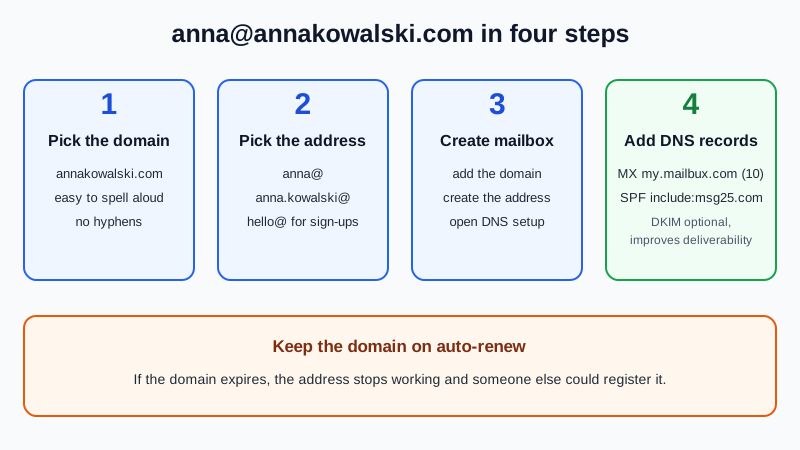
To get an email address with your name, register a domain that is your name (for example annakowalski.com), add that domain to an email host, and point it there with two DNS records: an MX record and an SPF record. You then create the address you like, such as anna@annakowalski.com. The domain is a yearly purchase from a registrar; the mailbox itself can be free. On the Mailbux Free plan the setup is a few minutes of clicking plus DNS waiting time, and the address is yours for as long as you keep renewing the domain.
Why a name domain instead of a name at Gmail or Outlook
On a big free webmail service, short name addresses like anna.kowalski@ were taken years ago, so you end up with numbers and dots. A name domain avoids that, and it travels with you:
| name@yourname.com | anna.kowalski1987@ a free webmail service | |
|---|---|---|
| Can you get the exact name? | Yes, if the domain is free to register | Rarely; common names are long gone |
| Can you change email provider later? | Yes, change two DNS records and keep the address | No, the address belongs to that provider |
| Extra addresses | Any name you like on the same domain | A new account each time |
| What it costs | The domain renewal each year; the mailbox can be free | Nothing |
| What can go wrong | Forget to renew and you lose the address | Locked account, no way to move the address |
Still deciding whether you need a domain at all? Do I need a domain for business email? answers that first.
Step 1: Pick the domain
Search for your name at any domain registrar. Good patterns, in rough order of how easy they are to say on the phone:
- firstnamelastname.com: the classic, for example annakowalski.com.
- lastname.com (or a .family ending): good if the whole family will use it, with one address per person.
- Your name with a country ending (.de, .co.uk, .nl and so on): often still free when the .com is taken, and fine for local customers.
- Name plus what you do, like annaphotography.com: works when your plain name is taken and you use the address for work.
Three checks before you pay: say it out loud and have someone type it, skip hyphens and doubled letters that people mistype, and read the full domain as one word to make sure it doesn't spell anything awkward. Some registrars bundle a mailbox trial or forwarding with the domain; free email with a domain purchase compares what they really include.
Step 2: Pick the address
With your own domain, the part before the @ is up to you. Common choices:
- anna@: short and personal, the most popular choice.
- anna.kowalski@: clearer when the domain is not your full name.
- hello@ or contact@: a second address for forms and sign-ups, so your personal one gets less spam.
Need more ideas? Professional email address ideas lists examples by situation.
Step 3: Create the mailbox
- Sign up at dash.mailbux.com. New accounts start in the onboarding wizard.
- Add the domain under Manage, then Domains, choose Add domain and enter your name domain.
- Create the address under Manage, then Mailboxes, for example anna, and set a strong password.
- Open the DNS values under Domains, then Open DNS setup. Each record has a copy button.
Step 4: Point the domain to the mailbox
Log in to the registrar where you bought the domain and open its DNS records page. Add:
| Type | Name / Host | Value | Needed? |
|---|---|---|---|
| MX | @ (or blank, depending on the registrar) | my.mailbux.com, priority 10 | Required |
| TXT | @ (or blank) | v=spf1 include:msg25.com ~all | Required (SPF) |
| TXT | shown in Open DNS setup | your DKIM value | Optional, improves deliverability |
Delete any MX records the registrar added by default, and keep only one SPF line. Each registrar's screens look different: we have step-by-step pages for Porkbun, GoDaddy, Namecheap and Cloudflare. If you only just bought the domain, I bought a domain, how do I get email on it? covers the first hour in more detail.
Step 5: Test it and start using it
- Wait until Open DNS setup shows the records as found (choose Re-check now after editing). Many changes show within an hour; some take up to a day or two.
- Send a message from your old address to the new one, then reply from Mailbux webmail. The reply should arrive with your new name address in the From line.
- Install the Mailbux app on your phone and sign in with the new address.
- Update the places that matter: your email signature, CV, online profiles, and the accounts you log in to.
Keep your name address safe
- Turn on auto-renew for the domain. If the domain expires, the address stops working, and someone else could register the domain and receive mail sent to it.
- Use a recovery address you control at the registrar and the email host, not the new address itself, so you can get back in if something breaks.
- Turn on two-factor sign-in for the mailbox and the registrar account.
- Keep the old address for a while. Tell contacts about the change and check the old inbox until mail there slows down.
What the free plan gives you
The Mailbux Free plan is free forever: 7 GB of shared storage, 1 domain, webmail, the Mailbux apps and SMTP sending, and outgoing mail carries a small "Sent via Mailbux" footer. The Free plan includes up to 7 business mailboxes, so partners or family members can each get their own name address on the same domain. On Free you read and send in Mailbux webmail and the Mailbux apps; standard IMAP and POP3 access for clients like Outlook or Apple Mail is available on paid plans. For the bigger picture, read our guide to a free business email account.
Frequently Asked Questions
Can I get an email address with my name for free?
The mailbox can be free, but the domain is not: you register it at a registrar and renew it every year. Offers of a "free domain" usually come with conditions, so read them before you build your address on one.
What if the domain with my name is taken?
Try another ending (a country ending or .net), add your middle initial, or add what you do, such as annadesign.com. Avoid near-copies of someone else's name domain, because their contacts' mail may reach you and yours may reach them.
Can my family use the same name domain?
Yes. One domain can hold several addresses, such as anna@ and tom@ on the same family name domain. On the Mailbux Free plan that is up to 7 mailboxes.
Can I keep my old Gmail or Outlook.com address?
Yes. Your old address keeps working on its own. The name domain is a separate, new address, so you can move contacts over at your own pace.
Does the free plan add anything to my emails?
Yes. Outgoing mail on the Mailbux Free plan carries a small "Sent via Mailbux" footer.
An address that is really yours
With Mailbux you get mailboxes on your own name domain, DNS values with copy buttons under Domains → Open DNS setup, DKIM signing, two-factor sign-in and app passwords, plus webmail and the Mailbux apps. Compare the plans and start with the one that fits.