
BIMI Explained: How to Show Your Brand Logo in the Inbox
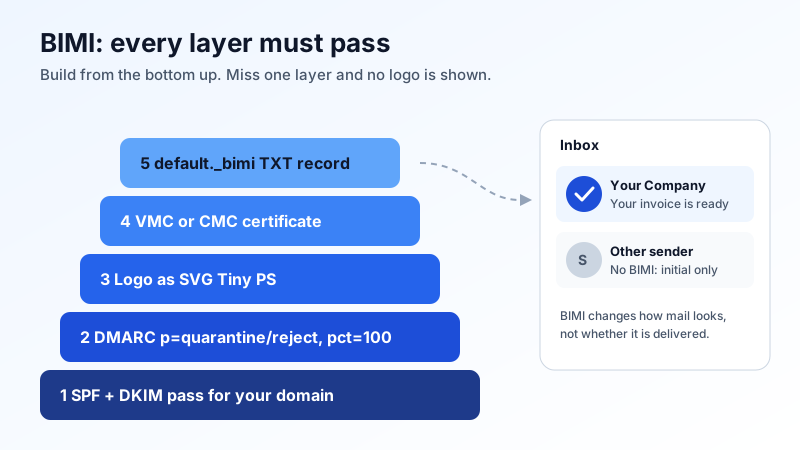
Some brands get their logo shown next to their emails in the inbox, while most senders get a grey circle with an initial. That logo usually comes from BIMI (Brand Indicators for Message Identification). It is an open standard, but it is not a quick setting: it sits on top of SPF, DKIM and a strict DMARC policy, and most big mailbox providers also want a paid certificate for your logo.
This guide explains what BIMI is, what you need before it can work, and how to decide if it is worth it for your business.
What BIMI does, and what it does not do
BIMI is a DNS record that tells receiving mail systems where to find your official logo. When a message from your domain passes DMARC, a provider that supports BIMI can fetch that logo and show it next to your message.
- It does: show your logo in supporting inboxes, which makes your real emails easier to recognise and fakes easier to spot.
- It does not: make mail reach the inbox. BIMI is a display feature. Delivery still depends on correct DNS records, your sending reputation and what you send.
- It does not: guarantee a logo. Each provider decides when and where to show it, and can skip it if it does not trust the sender.
The four requirements, in order
BIMI only works when each layer below it is already in place. Skip one and no logo appears.
1. SPF and DKIM pass for your domain
Your mail must be authenticated first. For a domain on Mailbux, the records are: MX my.mailbux.com with priority 10, and an SPF record that includes include:msg25.com. DKIM is set up automatically; the DKIM value to publish is shown under Domains → Open DNS setup in your dashboard. If you send from other services too (a newsletter tool, a shop, a CRM), each one must also pass SPF or DKIM with your domain. Our guide to SPF, DKIM and DMARC explains how the three fit together, and if you have more than one SPF record, merge them into one first.
2. DMARC at enforcement
This is the step that stops most businesses. BIMI is not supported with a monitoring-only DMARC policy. Google's BIMI setup rules, for example, say:
- the policy (
p=) must bequarantineorreject, notnone - the percentage (
pct=) must be 100, so the policy covers all of your mail
A record that meets this looks like:
_dmarc.yourdomain.com TXT "v=DMARC1; p=quarantine; pct=100; rua=mailto:[email protected]"Do not jump straight to enforcement. If a service that sends for you is not authenticated, its mail will start landing in spam or bouncing. Run with p=none first, read the reports and fix every legitimate source. Our guide to reading DMARC aggregate reports shows how. The DMARC value for your domain is listed under Domains → Open DNS setup.
3. A logo in the right SVG format
BIMI logos must be SVG files in the SVG Tiny Portable/Secure profile (SVG Tiny PS). A normal SVG exported from a design tool will usually fail. The main rules:
baseProfile="tiny-ps"andversion="1.2"on the root element- a
<title>element, ideally your company name - no scripts, animations, external links or embedded bitmap images
- no
x=ory=attributes on the root<svg>element - a square logo on a solid background works best, because inboxes crop it into a circle or a rounded square
Gmail adds its own rules: at least 96 × 96 pixels, set in absolute pixels, and a file size of 32 KB or less is recommended.
4. A mark certificate (for most big inboxes)
Many providers will only show a logo that a certificate authority has checked. There are two kinds:
| Verified Mark Certificate (VMC) | Common Mark Certificate (CMC) | |
|---|---|---|
| Logo must be | a registered trademark | not trademarked, but must meet the issuer's rules (for example, used publicly for a set period) |
| Gmail checkmark | yes, a verified checkmark next to the sender | no checkmark |
| Cost and time | yearly fee from the issuer; trademark can take months | yearly fee from the issuer; no trademark wait |
Google notes that registering a trademark can take 6 to 12 months, so plan ahead if you want a VMC. Gmail accepts a VMC or a CMC. Other providers set their own rules, so check the documentation of the inboxes your customers use most.
Publishing the BIMI record
Once the certificate is issued you receive a PEM file that contains your logo and the certificate. Put the SVG and the PEM file on an HTTPS web server on your domain, then add one TXT record:
default._bimi.yourdomain.com TXT "v=BIMI1; l=https://yourdomain.com/bimi/logo.svg; a=https://yourdomain.com/bimi/logo.pem"l=is the HTTPS link to your SVG logoa=is the HTTPS link to your certificate (PEM) filedefaultis the selector; you only need another one if different mail streams should show different logos
You add this record at your DNS host, the same place as your MX and SPF records. If you are not sure where that is, see how to add DNS records for your email domain. Logos can take a day or two to appear after the record is live, and providers cache them.
Common reasons the logo does not show
- DMARC is still
p=noneorpctis below 100. - The SVG is not Tiny PS. Validate it with a BIMI checker before you apply for a certificate.
- The provider needs a certificate and the record has only an
l=link. - A sending service fails DMARC. Mail from that source gets no logo and may be filtered.
- The logo or PEM link is not reachable over HTTPS, or redirects in a way the provider does not follow.
- Low sending reputation or volume. Providers can choose not to show logos for senders they do not yet trust.
Is BIMI worth it for a small business?
Look at it in two parts. The first part, getting SPF, DKIM and DMARC at enforcement, is worth doing for every business: it is what stops other people sending email as your domain. The second part, the certificate, is a yearly cost that mostly pays off when you send a lot of mail to consumer inboxes, for example newsletters, receipts or bookings. A small firm that mainly writes to other businesses may get little visible return from it.
A good plan: get DMARC to quarantine or reject this quarter, and decide on BIMI once that has run cleanly for a few weeks.
BIMI checklist
- ☐ MX, SPF and DKIM published and passing
- ☐ Every service that sends as your domain authenticated
- ☐ DMARC reports read and clean
- ☐ DMARC at
p=quarantineorp=reject,pct=100 - ☐ Logo converted to SVG Tiny PS and validated
- ☐ VMC or CMC issued (if your target inboxes need one)
- ☐ SVG and PEM hosted over HTTPS
- ☐
default._bimiTXT record published
Business email that is ready for DMARC
Mailbux gives you business email on your own domain, with DKIM set up automatically and the exact MX, SPF, DKIM and DMARC values for your domain under Domains → Open DNS setup, plus two-factor authentication and app passwords for each device. See the plans on our pricing page.