
Outlook.com Custom Domain: What Changed and What to Use Now
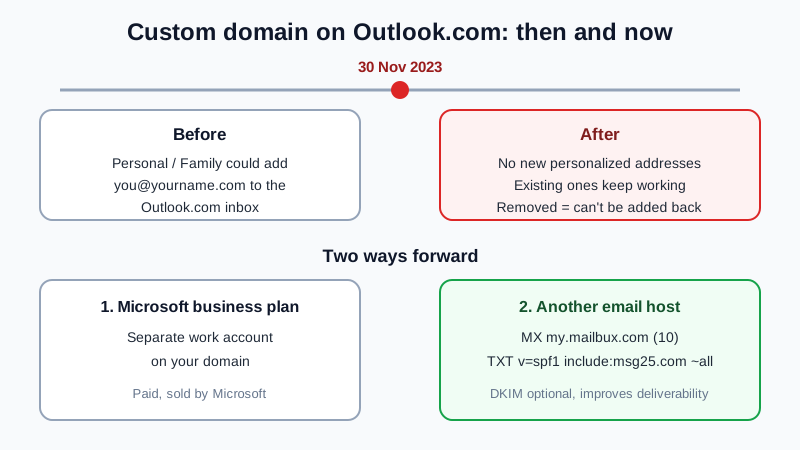
Short answer: you can no longer add a new custom domain to Outlook.com. Microsoft's notice "Changes to personalized email addresses in Outlook.com" said that starting 30 November 2023, Microsoft 365 Personal and Family subscribers can't associate a new personalized email address (like you@yourname.com) with an Outlook.com mailbox. Addresses set up before then keep working, but if you remove one, you can't add it back. To get email on your own domain today, you either use Microsoft's business plans or point the domain to another email host, for example a free one, by adding an MX and an SPF record at your registrar.
What changed, in plain words
For a few years, Microsoft 365 Personal and Family included a "personalized email address" feature in Outlook.com. You connected a domain, and the address was added to your existing Outlook.com mailbox, so mail to you@yourname.com arrived in the same inbox as your @outlook.com mail. Microsoft then closed the feature to new addresses:
- New addresses: since 30 November 2023 you can't associate a new personalized address with an Outlook.com mailbox.
- Existing addresses: if you set one up before that date, Microsoft said you can keep using it without disruption.
- Removing one is final: after 30 November 2023, a personalized address you remove can't be added back.
Microsoft's current page "Subscription features in Outlook.com for Microsoft 365 subscribers" (checked 13 November 2026) lists features like the ad-free mailbox, advanced security and larger storage. Personalized email addresses are not on the list. The same page says that if you cancel or let your subscription lapse, you keep the Outlook.com account but the subscription benefits are switched off.
Which situation are you in?
| Your situation | What it means | What to do |
|---|---|---|
| You want a new address on your domain in Outlook.com | Not possible since 30 November 2023 | Pick a business plan or another email host (below) |
| You already have a personalized address and it works | It keeps working while you keep it | Don't remove it until a replacement is ready |
| You removed the address, or it stopped receiving mail | It can't be added back | Point the domain to another email host |
| You want to drop the Microsoft 365 subscription | Subscription benefits switch off | Move the domain's mail first, then cancel |
Your two real options
1. A Microsoft business plan. Microsoft now sells own-domain email as part of its Microsoft 365 business plans. That is a separate work account, not your personal Outlook.com mailbox. If you want to stay with Microsoft, compare the plans on Microsoft's own site; our Outlook alternatives for business post covers the trade-offs.
2. Another email host on the same domain. You keep the domain at your registrar and only change where its mail goes. Many hosts work this way, including free ones. With the Mailbux Free plan, for example, the setup is:
- Find where the domain's DNS lives. Log in to the company where you registered the domain (or where its nameservers point). That is where mail records are edited. If it's at GoDaddy, our GoDaddy email setup page walks through its screens; there are pages for Porkbun, Namecheap, Cloudflare and others too.
- Create the mailbox first. Sign up at dash.mailbux.com, add the domain under Manage, then Domains, and create your address under Mailboxes, so nothing bounces during the switch.
- Replace the MX record. Delete the old MX record that points to Microsoft and add an MX record for the root domain: my.mailbux.com, priority 10.
- Fix SPF. Keep one SPF TXT record only:
v=spf1 include:msg25.com ~all. If the old line has a Microsoft include and nothing sends through Microsoft any more, replace it. - Optional: DKIM. DKIM is optional and improves deliverability. Copy its value from Domains, then Open DNS setup, and add it as a TXT record.
- Test. Send a message from a personal address to your domain address, reply from webmail, and check that the reply shows your domain in the From line.
The full record-by-record walkthrough is in I bought a domain, how do I get email on it?; the steps are the same whether the domain is new or used to point to Outlook.com.
Keep your old mail before you switch
Once the MX record points elsewhere, new mail stops reaching Outlook.com. Mail already there stays in the Outlook.com account. Before you switch, decide what you need from it: move important threads into folders you can find, or copy them out. The Mailbux migration tool copies mail from an IMAP account into Mailbux and works on every plan, Free included, if your old account allows IMAP access. Our guide to moving email without losing messages has the checklist.
What you give up, honestly
- One inbox for everything. The old feature put your domain address and your @outlook.com address in one inbox. With a separate email host, your domain mail lives in its own mailbox.
- Desktop apps on Free. On the Mailbux Free plan you read and send mail in Mailbux webmail and the Mailbux apps. Standard IMAP and POP3 access for clients like Outlook or Apple Mail is available on paid plans, so if you want the Outlook app on your desktop, that needs a paid plan.
- A footer on Free. Outgoing mail on the Free plan carries a small "Sent via Mailbux" footer.
For the full list, the Mailbux Free plan is free forever: 7 GB of shared storage, 1 domain, webmail, the Mailbux apps and SMTP sending, and outgoing mail carries a small "Sent via Mailbux" footer. The Free plan includes up to 7 business mailboxes, so a family or a small team can each have an address. If you only need mail passed on to an inbox you already have, read email forwarding vs email hosting first. For a wider view of free options, see our free business email account guide.
Frequently Asked Questions
Can I still add a custom domain to Outlook.com?
No. Microsoft stopped new personalized email addresses for Outlook.com on 30 November 2023. Addresses added before that date keep working.
Will my existing Outlook.com personalized address stop working?
Microsoft said existing personalized addresses continue to work without disruption. If you remove one, you can't add it back, so keep it until your replacement is set up.
What happens to my Outlook.com account if I cancel Microsoft 365?
Microsoft says you keep access to the Outlook.com account, but the subscription benefits are switched off. Move your domain's mail before cancelling so you know where new mail goes.
Can I use my domain with another email host and keep my @outlook.com address?
Yes. The @outlook.com address is part of your Microsoft account and does not depend on your domain. Only mail to your own domain moves to the new host.
Can I read the new mailbox in the Outlook app?
On the Mailbux Free plan you use webmail and the Mailbux apps. Outlook, Apple Mail and other desktop clients connect over IMAP, which is available on paid plans.
Sources: Microsoft notice "Changes to personalized email addresses in Outlook.com" as quoted on Microsoft Q&A (learn.microsoft.com, question 5170386), and Microsoft Support "Subscription features in Outlook.com for Microsoft 365 subscribers" (support.microsoft.com), both checked 13 November 2026.
Your domain, your mailbox
With Mailbux you get mailboxes on your own domain, DNS values with copy buttons under Domains → Open DNS setup, DKIM signing, two-factor sign-in and app passwords, plus webmail and the Mailbux apps. Compare the plans and start with the one that fits.