
Email Forwarding vs Email Hosting: Which One Do You Need?
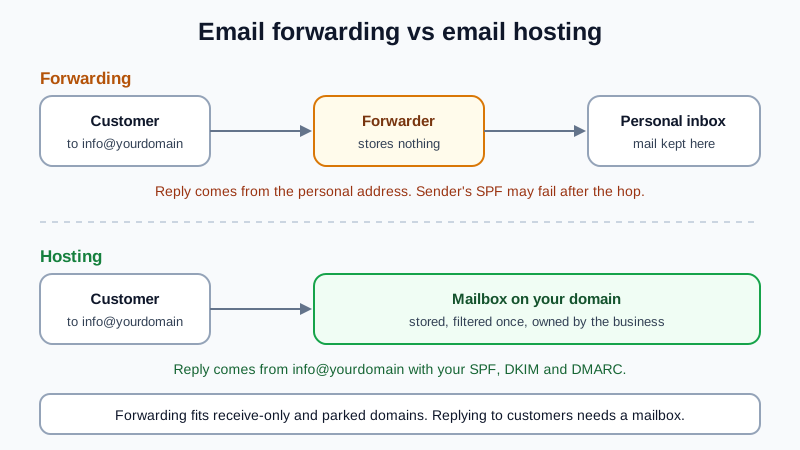
Email forwarding passes mail sent to you@yourdomain.com on to an inbox you already have, such as a personal webmail address. It stores nothing and usually cannot send as your domain. Email hosting gives the address a real mailbox that receives, stores and sends mail as you@yourdomain.com. Forwarding is enough for a parked domain or an address that only receives. Choose hosting as soon as you reply to customers, share addresses with a team or need forwarded mail to stop landing in spam. Both can cost nothing: many registrars include forwarding, and some email hosts have a free plan.
This page helps you decide. If you have already decided and want to switch, the step-by-step guide is moving from email forwarding to a real mailbox.
How each one works
Forwarding. Your domain's MX record points to a forwarding service, often run by the registrar. When a message arrives for info@yourdomain.com, the service looks up a rule ("info goes to anna.smith@gmail.com") and sends the message straight on. Nothing is kept at the domain. The mail lives in the personal inbox, under that provider's account and rules.
Hosting. Your domain's MX record points to an email host. Each address is a mailbox with its own password, storage, spam filter and outgoing server. You read and send in the host's webmail or apps, and the mail stays with the domain, not with someone's personal account.
Email forwarding vs email hosting side by side
| Email forwarding | Email hosting | |
|---|---|---|
| Receive at you@yourdomain | Yes, passed on to another inbox | Yes, delivered to your own mailbox |
| Send and reply as you@yourdomain | No, unless you add a workaround with an outgoing server from somewhere else | Yes, built in |
| Where mail is stored | In the personal inbox it was forwarded to | In the domain's mailbox |
| Spam filtering | Spam is forwarded too; the final inbox filters it | Filtered once, at the mailbox |
| SPF results on incoming mail | Often fail, because the forwarder relays the message | Checked directly against the real sender |
| Your own SPF, DKIM and DMARC for sent mail | Nothing to publish, since nothing is sent from the domain | Published for your domain |
| A team of several people | Each address goes to someone's private inbox | One mailbox per person, plus shared or alias addresses |
| When someone leaves | Their copy of past mail leaves with their personal inbox | The mailbox stays; you reset the password or reassign it |
| DNS records | The forwarder's MX (and sometimes SPF) | The host's MX and SPF; DKIM optional |
| Typical cost | Often included with the domain | Paid per user at many hosts; some hosts have a free plan |
Why forwarded mail lands in spam or bounces
This is the part most people only discover after a client says "I sent it twice". Three mail standards decide whether a message is trusted, and forwarding upsets two of them:
- SPF checks the server that hands over the message. After forwarding, that server is the forwarder, not the original sender. The sender's SPF record does not list the forwarder, so the check fails at the final inbox. Good forwarders rewrite the envelope sender (a method called SRS) to avoid this, but not every forwarder does.
- DKIM survives only if the message is not changed. A forwarder that adds a footer, a subject tag or rewrites links breaks the signature.
- DMARC needs SPF or DKIM to pass for the sender's own domain. If SPF failed because of forwarding and DKIM broke on the way, a sender with a strict DMARC policy has asked inboxes to reject or quarantine the message. It never reaches you, and nobody is told.
On top of that, every spam message sent to your domain is forwarded as well, so the receiving inbox sees a stream of spam arriving from the forwarder. With a hosted mailbox, the checks run once, against the real sender, before anything is stored.
The "send as" workaround and its limits
Forward-only users who want replies from their domain usually add a "send mail as" address in their personal inbox. It can work, but you still need an outgoing mail server that is allowed to send for your domain, and your SPF record has to list it. Without that, replies go out from servers your domain never authorised, and strict receivers mark them as suspicious. Each person also has to set it up again on every device, and a reply sent from the wrong account shows the personal address to a customer. By the time you have an outgoing server, an SPF record and per-person setup, you have rebuilt most of an email host, without the mailbox. Our guide on using a custom domain address with Gmail covers that route in detail.
When forwarding is enough
- Parked or defensive domains. You own yourbrand.net only so nobody else does. Forward everything to your main address and forget it.
- An old brand after a rename. Forward the old domain to the new mailboxes so stray messages still arrive while people update their contacts.
- Receive-only addresses. A sign-up or notification address that nobody ever replies from.
- A weekend project. You are testing an idea and do not write to customers yet.
When you need email hosting
- You reply to customers and want the reply to come from the same address they wrote to.
- More than one person handles mail, or roles like sales@ and support@ change hands.
- Messages go missing or land in spam and you cannot tell why.
- You send invoices or contracts and want them signed with your domain's DKIM and covered by your SPF and DMARC.
- You want the business to own the mail, not a set of personal accounts.
You can use both
A domain's MX record points to one place, so for the same domain you pick either a forwarder or a host for incoming mail. But a host can do what forwarding did: aliases deliver several addresses (hello@, info@, billing@) into one mailbox, and a mailbox can pass copies on where needed. A second domain you only keep for redirects can stay on registrar forwarding into your hosted mailboxes. To see what your registrar includes with a domain, from forwarding to trial mailboxes, see free email with a domain purchase.
Does hosting cost more than forwarding?
Not necessarily. Forwarding is often included with a domain, and a mailbox can be free too. The Mailbux Free plan is free forever: 7 GB of shared storage, 1 domain, webmail, the Mailbux apps and SMTP sending, and outgoing mail carries a small "Sent via Mailbux" footer. The Free plan includes up to 7 business mailboxes. On Free you read and send in Mailbux webmail and the Mailbux apps; standard IMAP and POP3 access for clients like Outlook or Apple Mail is available on paid plans. For how the free options compare, read the free business email guide.
The switch itself is two DNS records: an MX record pointing to my.mailbux.com with priority 10, and an SPF record that includes msg25.com. DKIM is optional and improves deliverability. If your domain is at Hostinger or your site runs on Webflow, see free email for a Hostinger domain or email for a Webflow site.
Frequently Asked Questions
Is email forwarding the same as email hosting?
No. Forwarding only passes incoming mail on to another inbox. Hosting gives the address its own mailbox that stores mail and sends as your domain.
Can I reply from a forwarded address?
Not by default. Replies come from the inbox the mail was forwarded to. Sending as your domain needs an outgoing server allowed by your SPF record, which a mail host provides.
Why do forwarded emails go to spam?
The final inbox sees the message arrive from the forwarder, so the original sender's SPF check fails, and any change on the way breaks DKIM. Spam is forwarded too, which lowers trust in the stream.
Can I have forwarding and a mailbox on the same domain?
Not from two different providers for incoming mail, because the MX record points to one place. Use the host's aliases and forwarding instead, or keep registrar forwarding on a separate domain.
Will I lose mail if I switch from forwarding to hosting?
No, if you create the mailboxes first, then change the MX and SPF records, and only then remove the old forwarding rules.
Email that belongs to your domain
With Mailbux every address is a real mailbox on your own domain: send and reply as you@yourdomain.com, aliases for role addresses, SPF, DKIM and DMARC values with copy buttons under Domains → Open DNS setup, two-factor sign-in and app passwords. Compare the plans and pick the one that fits.