
Email Retention Policy for Small Business: How Long to Keep Email (Free Template)
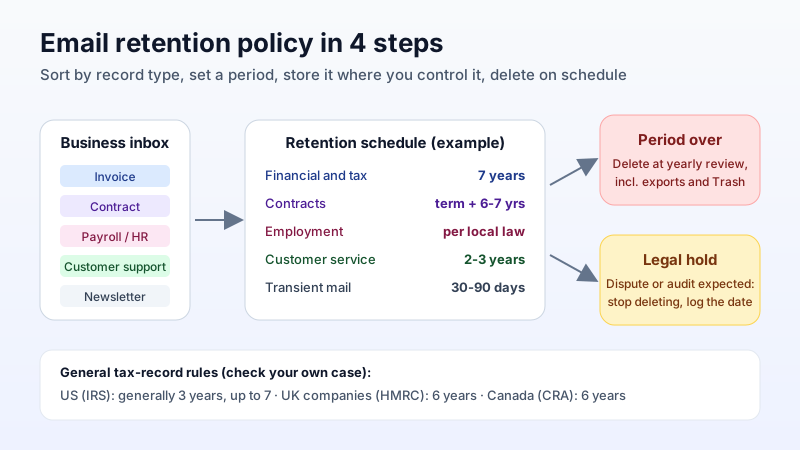
Most small businesses have an email retention policy by accident: nobody deletes anything, mailboxes grow for years, and when someone finally asks "how long are we supposed to keep this?", there is no answer. A short written policy fixes that. It tells your team what to keep, for how long, where it lives, and when it is deleted, and it gives you a defensible answer if a tax office, a client or a court ever asks.
This guide is about the policy: the retention periods, the deletion rules and the one-page template. If you want the storage side (how to keep a searchable copy of old mail), read our email archiving guide after this one.
Not legal advice. The periods below come from official tax-authority pages and are general rules. Your industry, country and contracts may require longer. Check with your accountant or lawyer before you set the final numbers.
Why "keep everything forever" is not a policy
Keeping every message feels safe, but it creates three problems:
- Privacy law works against it. Under the GDPR (Article 5(1)(e), "storage limitation"), personal data must be kept "for no longer than is necessary for the purposes for which the personal data are processed". Customer emails, CVs from job applicants and HR threads are full of personal data. "We never delete" is hard to defend.
- Everything you keep can be requested. In a dispute or a data-access request, old mail you still hold may have to be searched and handed over. Mail you deleted on schedule, under a written policy, before any dispute started, is simply gone.
- Nobody can find anything. A mailbox with 15 years of newsletters, receipts and contracts mixed together is slow to search, and the important records get lost in the noise.
The opposite mistake is just as bad: deleting invoices, contracts or payroll emails before the law says you can. A retention policy sits between the two.
Step 1: sort email into record types, not mailboxes
Email is a delivery channel, not a record type. The same mailbox holds an invoice, a lunch invitation and a signed contract. Retention periods depend on what the message is, so start with a short list of categories:
- Financial and tax records: invoices, receipts, payment confirmations, quotes that became orders.
- Contracts and agreements: signed agreements, terms you accepted, and the emails that changed them.
- Employment records: offers, payroll, leave, performance and disciplinary threads.
- Customer service: support conversations and complaints.
- Applicant data: CVs and interview emails from people you did not hire.
- Transient mail: newsletters, notifications, scheduling and internal chit-chat.
Five or six categories is enough for a small business. More than ten and nobody will follow it.
Step 2: set a retention period per category
Here is what the tax authorities in the three markets most of our readers work in say about business records. Emails that are or support those records (an emailed invoice, a receipt, a payment confirmation) fall under the same rules.
| Country | General rule for business records | Source |
|---|---|---|
| United States | Generally 3 years after filing the return. 6 years if income was under-reported by more than 25%, 7 years for a bad-debt or worthless-securities claim. Employment tax records: at least 4 years after the tax is due or paid, whichever is later. | IRS, "How long should I keep records?" |
| United Kingdom (limited companies) | 6 years from the end of the last company financial year they relate to, or longer in some cases (for example a transaction covering more than one accounting period). | GOV.UK, "Company and accounting records" |
| Canada | Generally 6 years from the end of the last tax year they relate to. | Canada Revenue Agency, "Where to keep your records, for how long..." |
Many small businesses simplify this into a working schedule like the one below. Treat it as a starting point to adjust, not a rule:
| Category | Typical starting point | Then |
|---|---|---|
| Financial and tax | 7 years (covers the common US, UK and Canadian periods with a margin) | Delete |
| Contracts | Length of the contract + 6 to 7 years | Delete |
| Employment | Duration of employment + the period your local law requires | Delete |
| Customer service | 2 to 3 years after the last contact | Delete |
| Applicants not hired | A few months, unless they agreed to longer | Delete |
| Transient mail | 30 to 90 days, or delete on reading | Delete |
Two rules override every period in the table: a legal hold (see Step 4) and any longer period your regulator, insurer or lender requires. The IRS page says the same thing: before you discard records, check whether you have to keep them longer for other purposes.
Step 3: decide where retained mail lives
A retention period only works if the email still exists and can be found. Decide this once:
- Keep business records in a business mailbox. If invoices go to a sole trader's personal Gmail, the business does not control them. Mail on your own domain stays with the company when people come and go.
- Use folders that match the categories. A folder per category (or per year inside "Finance") makes it easy to apply a deletion date later. Server-side folders sync over IMAP, so the same structure shows up in webmail, on phones and in desktop clients.
- Keep a second copy of long-lived records. Retention is not backup. For records you must keep for years, export a yearly copy (for example to an .mbox file from a desktop client connected over IMAP) and store it somewhere separate. Our email backup guide covers the options, and our guide to importing .mbox, .pst and .eml archives shows how to get such a file back into a mailbox if you need it.
- Know where the data is stored. Privacy rules care about location as well as duration. Write down which provider and region holds your mail. Mailbux, for example, hosts mail on servers in the EU, US and Canada.
Step 4: write the deletion rules (and the exceptions)
The deletion half is the part most policies skip, and the part that makes them useful.
- Who deletes: each mailbox owner for their own mail, or one named person for shared and former-employee mailboxes.
- When: pick one review date a year (for example the month after your financial year closes) and delete everything that has passed its period.
- How: delete the message, then empty Trash. Remember the copies: a yearly export file, a forwarded copy in another mailbox, or an old laptop with a desktop client may still hold the same mail.
- Legal hold: the moment you expect a dispute, claim, audit or investigation, stop deleting anything related to it, even if its period has expired. Write down when the hold started and who lifted it.
- Leavers: when an employee leaves, do not delete their mailbox on day one. Move or keep the business records it contains according to the schedule, then remove the rest.
A one-page template you can copy
Paste this into a document, fill in the brackets, and have the business owner sign and date it:
- Scope: all email sent or received on [yourdomain.com] by employees and contractors.
- Owner: [name] is responsible for this policy and the yearly review.
- Categories and periods: [your table from Step 2].
- Storage: business email is kept only in company mailboxes on our domain, filed in folders by category. Long-lived records are exported once a year to [location].
- Deletion: every [month], [owner] deletes mail past its period, including exported copies and Trash.
- Legal hold: deletion stops for any matter under dispute, audit or investigation until [owner] lifts the hold in writing.
- Leavers: records in a leaver's mailbox are kept or moved per this schedule before the mailbox is closed.
- Personal data: mail containing personal data is not kept longer than this schedule needs. Access requests are handled by [name].
- Review: this policy is reviewed every [12] months. Last reviewed: [date].
For the wider compliance picture (consent, unsubscribe rules, data-subject rights), see our business email compliance guide.
Common mistakes
- Setting periods nobody follows. One annual review date beats a dozen rolling rules.
- Forgetting the copies. Deleting from the server while a five-year-old export file sits on a shared drive does not meet a deletion rule.
- Treating email as one category. "Keep all email 7 years" over-keeps applicant data and under-thinks contracts.
- Running the business on a personal address. If records live in someone's private inbox, the policy cannot reach them.
Start with mail you control
A retention policy assumes your business email lives in mailboxes the company owns. Mailbux gives you business email on your own domain, folders that sync over IMAP to webmail, phone and desktop, two-factor authentication with app passwords, and the SPF, DKIM and DMARC values for your domain under Domains → Open DNS setup. See the plans on our pricing page.