
How Many Business Email Accounts Does a Small Business Need?
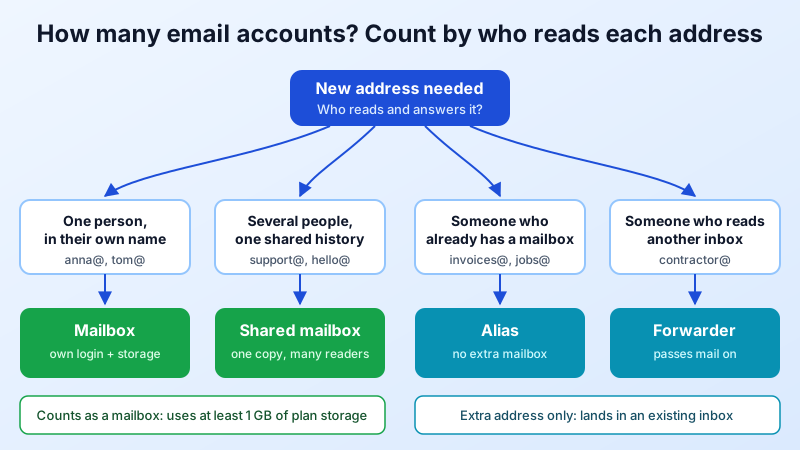
"How many email accounts does my business actually need?" sounds like a simple headcount question, but it rarely is. Most small businesses end up with either too few addresses (everyone shares one login and nobody knows who replied) or too many (a mailbox for every idea, half of them never read). This guide gives you a simple way to count, shows which addresses deserve a real mailbox and which should be an alias or forwarder, and explains how the number affects what you pay.
The Short Answer
For most small businesses the right number is: one mailbox per person who sends email in their own name, plus one mailbox per shared team inbox that several people work from. Everything else (info@, hello@, billing@, old addresses you want to keep alive) is usually an alias or forwarder, not a separate mailbox.
A 6-person company typically lands on 6–8 mailboxes and 5–10 aliases. A 20-person company is often 20–24 mailboxes and a dozen or more aliases.
Mailbox, Alias or Forwarder: Know What You Are Counting
Before you count, be clear about the three building blocks, because only one of them needs its own login and storage:
- Mailbox: a real account with its own password, its own storage and its own sent folder. Use it for a person, or for a team inbox that several people open.
- Alias: an extra address that delivers into an existing mailbox. sales@ can be an alias of anna@, so Anna receives it without a second login.
- Forwarder: an address whose mail is passed on to another address, inside or outside your domain. Useful for a part-time contractor or a temporary campaign address.
If you are unsure which one fits a team address, our comparison of shared mailbox vs alias vs distribution list walks through each option with examples.
A 5-Step Way to Count Your Accounts
1. List every person who emails customers, suppliers or partners
Owners, staff, part-timers and long-term contractors who write in the company's name each get a personal mailbox (firstname@ or firstname.lastname@). A personal address keeps a clear record of who said what, and when someone leaves you can hand their mailbox to a colleague instead of losing the history.
2. List the jobs, not the people
Write down the functions that receive email: support, sales, invoices, bookings, careers, press. For each one ask: does more than one person need to read and answer this, from a shared history?
- Yes: make it a shared mailbox (for example support@ opened by three people).
- No, one person handles it: make it an alias of that person's mailbox (for example invoices@ to your bookkeeper).
3. Add the system addresses
Some addresses exist mainly for machines: website contact forms, booking tools, payment notifications, a no-reply@ for automated messages. If nobody needs to log in to them, an alias or forwarder is enough. If an application needs to log in and send through your mail server, give it its own mailbox so you can change that password without touching anyone's personal account.
4. Plan for the next 12 months
Count the hires, seasonal staff and new brands you expect this year. If you plan to add a second business or a new domain, its addresses count too, and you can host several domains in one account.
5. Remove what nobody reads
An unread mailbox is a security and compliance risk: it collects invoices, password resets and phishing that nobody sees. If an address is only kept "just in case", turn it into an alias or forwarder that lands in an inbox someone actually checks.
Example: A 6-Person Design Studio
| Address | Type | Why |
|---|---|---|
| maria@, tom@, lea@, sam@, joe@ | Mailbox (5) | Each person emails clients in their own name |
| hello@ | Shared mailbox (1) | Three people answer new enquiries from one history |
| invoices@ | Alias of maria@ | Only the owner handles billing |
| jobs@ | Alias of tom@ | One person reviews applications |
| info@, contact@ | Alias of hello@ | Old addresses printed on business cards |
| freelancer@ | Forwarder | A contractor reads it in their own inbox |
| no-reply@ (website) | Mailbox (1) | The website logs in to send notifications |
Total: 7 mailboxes and 5 extra addresses that cost nothing in storage. The sixth person, a part-time assistant, uses the hello@ shared mailbox and does not need a personal one yet.
How Much Storage Does Each Mailbox Need?
The number of mailboxes is only half of the plan; the other half is how much mail each one keeps. A sales mailbox with years of attachments grows much faster than a no-reply@ address. As a rough guide, light users stay under 1–2 GB for a long time, while people who send large files or keep everything can need 5–10 GB or more. Our guide to email storage limits explains how to estimate this for your team.
Why the Count Matters for Your Bill
With per-user email plans, every mailbox you add is another monthly seat, so businesses are tempted to squeeze several people into one shared login. That saves money but loses accountability and makes it hard to remove access when someone leaves.
Mailbux paid plans work differently: they include unlimited business mailboxes, domains and aliases with no per-user fees, and you pay for a pool of storage that all mailboxes share. Each mailbox uses at least 1 GB of plan storage, so the plan size sets how many mailboxes fit:
| Plan | Price | Shared storage | Mailboxes at 1 GB each |
|---|---|---|---|
| Free | $0 | 7 GB | Up to 7 (1 domain) |
| Starter | $4.95/month | 10 GB | Up to 10 |
| Professional | $7.95/month | 20 GB | Up to 20 |
| Business | $15.90/month | 45 GB (more can be added) | Up to 45 |
Prices from the live Mailbux plan catalog, checked 2026-10-16. Yearly billing is also available on paid plans.
In the studio example, 7 mailboxes fit on Free, but the team would likely choose Starter: it adds IMAP and POP3 for desktop clients, removes the "Sent via Mailbux" footer, allows more than one domain and leaves room for three more mailboxes. If several of those mailboxes keep large archives, Professional gives each one more space. For a deeper look at the two pricing models, read unlimited email accounts vs per-user plans.
Common Mistakes to Avoid
- One login shared by the whole team. You cannot tell who sent what, and every staff change means a password reset for everyone.
- A mailbox for every address. Each one needs a password, storage and someone to read it. Use aliases for addresses that one person already handles.
- Forgetting leavers. When someone leaves, change the password, then keep the mailbox or turn the address into an alias of their replacement so customers' replies are not lost.
- Personal free-mail addresses for business. Customers trust [email protected] more, and the business keeps the history. See why a small business needs professional email.
Moving Existing Accounts Over
If you already have mail at another provider, you do not have to start empty. Mailbux offers free migration of up to 10 mailboxes: open a ticket after you sign up and the team will help move your existing mail. Once your domain is connected, point your MX record to my.mailbux.com with priority 10, add include:msg25.com to your SPF record, and copy the DKIM and DMARC records shown under Manage → DNS in your dashboard.
Quick Checklist
- One mailbox per person who emails in their own name.
- One shared mailbox per team inbox answered by several people.
- Aliases for addresses one person already handles.
- Forwarders for contractors and temporary addresses.
- A dedicated mailbox for any app that sends through your mail server.
- Room for this year's hires, and storage sized to how much mail people keep.
Set Up Your Team's Addresses
Mailbux gives you unlimited business mailboxes on paid plans (each mailbox uses at least 1 GB of plan storage), unlimited aliases and domains, and servers in the EU, US and Canada. Start with the Free plan for up to 7 mailboxes, then upgrade when your team grows.