
Email for Your Etsy Shop: Messages, Your Own Address and Pattern
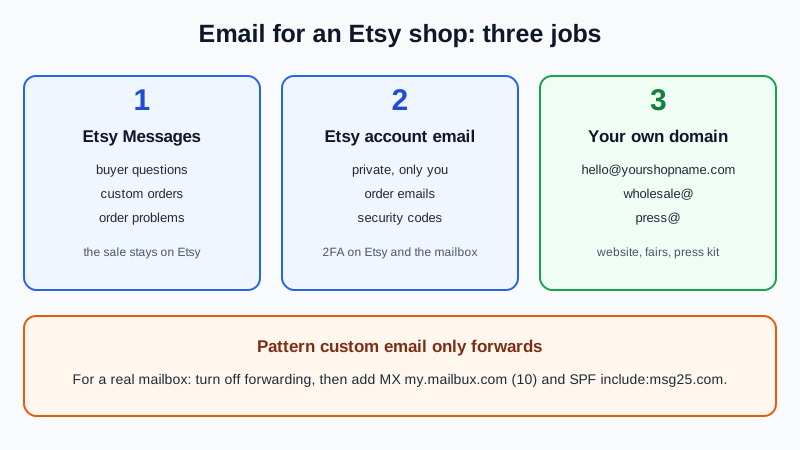
An Etsy shop needs email for three different jobs. Buyer questions stay in Etsy Messages, which is what Etsy recommends. Your Etsy account sits on an address only you control, with two-factor sign-in, because order emails and security codes go there. Then an address on your own domain, such as hello@yourshopname.com, handles the contacts that find you outside Etsy: wholesale buyers, press and collaborations. If you run a Pattern site, its built-in custom address only forwards mail to another inbox. For a real mailbox you add MX records to the domain.
What Etsy already sends to your email
- Order emails. After a sale, Etsy emails you at the address on your Etsy account. Etsy suggests adding transaction@etsy.com to your contacts so these don't land in spam.
- Security codes. Etsy may email a one-time code to that address when you sign in or change the address.
- Message alerts. New Etsy Messages trigger a notification email, but the conversation itself lives on Etsy.
Whoever controls that inbox receives your security codes.
Etsy Messages vs your own address
Etsy's phishing guidance tells sellers to keep all buyer communication in Messages and says an email is never required for a buyer to complete a purchase. Asking a buyer to pay outside Etsy checkout breaks Etsy's policies, and Etsy scans Messages partly to catch attempts to send buyers off the site. Sellers may share links to their own website and social media.
The simple rule: anything that starts on Etsy stays on Etsy, including custom orders and payment. Your own domain address is for people who reach you another way, such as your website, a craft fair or a magazine.
Which address for what
| Job | Use | Why |
|---|---|---|
| Etsy account sign-in, orders, security codes | A private address only you use, such as owner@yourshopname.com or your current personal inbox | Etsy sends codes here; keep it off your website |
| Buyer questions, custom orders, order problems | Etsy Messages | Etsy's recommendation; the sale stays on Etsy |
| Contact on your website and social profiles | hello@yourshopname.com | A public address for business cards and fair signs |
| Wholesale and stockists | wholesale@yourshopname.com | Bulk inquiries from boutiques in one place |
| Press, bloggers, collaborations | press@yourshopname.com | Easy to put in a press kit |
| Helpers in your shop | Their own Etsy accounts through shared access | Never share your password or account inbox |
Etsy's shared access lets up to 5 team members sign in with their own Etsy accounts and 2FA, without seeing your finances or credentials.
Should the Etsy account stay on your personal Gmail?
It can. A shop-only address keeps order mail out of your personal inbox. The trade-off: if the account address is on your own domain and the domain expires, Etsy's security codes stop reaching you. Put the domain on auto-renew first. Unsure about a domain? Do I need a domain for business email? helps you decide.
To switch, go to Your account, Account settings, scroll to Email, enter the new address under Change your email and select Change Email. Etsy sends a security code to the current address, so switch while you can still read it. After a change you must wait 24 hours before changing again. A PayPal email used for payments is changed separately in Payments settings.
Pattern sites and domains
Pattern, Etsy's paid website builder for sellers, is still live in November 2026. Email depends on where your domain came from:
- Domain registered through Pattern. The Marketing tab can create an @domain.com email alias. Etsy says it only forwards to an inbox you already own, and replies go out from that inbox. For a real mailbox, turn off forwarding in the Marketing tab, then go to Domains, Manage Domain, Manage records, Add Record and add MX and TXT records. Leave the A and patternbyetsy.com CNAME records alone, or the site stops loading.
- Domain from another registrar. Etsy says to set up email with your domain provider. Pattern only needs its A record (130.211.40.170) and the www CNAME to patternbyetsy.com; MX and SPF sit next to them.
- No domain. The default patternbyetsy.com address can't have custom email.
- No Pattern. Etsy lets you redirect your own domain to your Etsy shop through your domain provider. That is a web redirect; email is set up separately with MX records.
Using forwarding for now? Moving from email forwarding to a real mailbox explains the later switch.
Set up your shop addresses
- Sign up at dash.mailbux.com and add your shop domain under Manage, then Domains.
- Create the mailboxes under Manage, then Mailboxes: for example hello, wholesale and press.
- Copy the DNS values from Domains, then Open DNS setup.
- Add the records where your DNS lives: Pattern's Manage records screen, or your registrar (see our GoDaddy, Namecheap and Squarespace guides). Keep only one SPF line.
- Re-check in Open DNS setup until the records show as found.
- Test by emailing hello@ from your personal inbox and replying from Mailbux webmail.
- Publish the public address on your website (Pattern's Contact Us page has an Email address field) and social profiles. On Etsy, link your website in the About section's Links area.
| Type | Name / Host | Value | Needed? |
|---|---|---|---|
| MX | @ (or blank) | my.mailbux.com, priority 10 | Required |
| TXT | @ (or blank) | v=spf1 include:msg25.com ~all | Required (SPF) |
| TXT | shown in Open DNS setup | your DKIM value | Optional, improves deliverability |
Keep the shop account safe
- Turn on 2FA at Etsy. Etsy requires it for new shops and strongly recommends it for existing sellers: Account settings, Security, Turn on 2FA. Save the backup codes, and protect the mailbox with two-factor sign-in too.
- Know real Etsy contact. Real Etsy messages sit in the From Etsy inbox with a From Etsy badge. Etsy never asks for your password in Messages and has no customer service phone number.
- Treat "let's move to email" as a warning. Etsy lists senders who insist on a personal email address, urgent suspension threats and QR codes as phishing signs.
- Report fakes. Use Report on suspicious Messages and send suspected Etsy phishing emails to ReportPhishing@etsy.com.
- Unexpected sign-in alert? Etsy says to reset your Etsy password and the password of the linked email account.
What the free plan covers
The Mailbux Free plan is free forever: 7 GB of shared storage, 1 domain, webmail, the Mailbux apps and SMTP sending, and outgoing mail carries a small "Sent via Mailbux" footer. The Free plan includes up to 7 business mailboxes, enough for hello@, wholesale@, press@ and a private account address. On Free you use webmail and the Mailbux apps; standard IMAP and POP3 access for clients like Outlook or Apple Mail is available on paid plans. For the wider view, see our guide to free business email accounts.
Frequently Asked Questions
Can I give buyers my email address in Etsy Messages?
Etsy recommends keeping all buyer communication in Messages, and payment must go through Etsy checkout. Answer Etsy buyers on Etsy.
Does the Pattern custom email give me an inbox?
No. It forwards to an inbox you already own, and replies come from that inbox's address. For a mailbox that sends as your shop address, turn off forwarding and add MX records.
Can my Etsy account use my own domain address?
Yes, under Account settings, Email. Keep the domain on auto-renew and protect the mailbox with two-factor sign-in.
Will Etsy order emails still reach me after I switch?
Yes, at whatever address is on your Etsy account. Add transaction@etsy.com to your contacts.
Does the free plan add anything to my emails?
Yes. Outgoing mail on the Mailbux Free plan carries a small "Sent via Mailbux" footer.
Give your shop its own address
With Mailbux you get mailboxes on your shop's domain, DNS values with copy buttons under Domains → Open DNS setup, DKIM signing and two-factor sign-in, plus webmail and the Mailbux apps. Compare the plans and start with the one that fits your shop.
Sources: Etsy Help Center (help.etsy.com) articles What to Do After You Sell an Item, Security Code Email, Change the Email Address on Your Etsy Account, Protect Yourself from Phishing Scams, Off-Platform Transaction Scams, How Etsy Scans Messages, Shared Access for Shop Owners, Make Your Account More Secure, Recent Sign-In Email, What is Pattern?, Marketing Settings in Pattern, Manage Your Pattern Domain, Connect a Third-Party Domain to Pattern, Pattern Website Editor, Shop About Section and Redirect Your Domain to Your Etsy Shop, all checked 14 Nov 2026.