
Business Email Footer Legal Requirements in the UK and EU
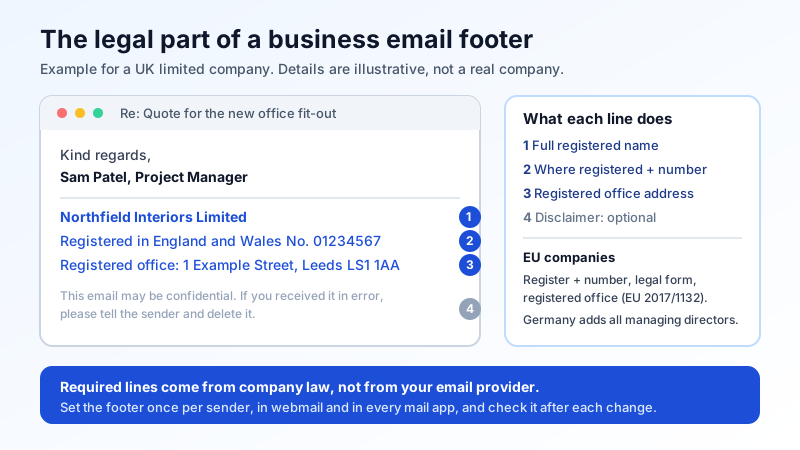
Most people think of the email footer as branding: a name, a job title, a logo, maybe a phone number. For a registered company in the UK or the EU, part of that footer is a legal requirement. Company law says which details must appear on business letters, and those rules are written to cover electronic messages too.
This guide lists what UK and EU law actually asks for, what is optional, and how to set a footer that stays correct on every device your team sends from. It is a practical summary, not legal advice. If your company has an unusual structure, check with your accountant or lawyer.
Signature, footer, disclaimer: three different things
- Signature: the personal part. Name, role, direct phone number. This is about looking professional, and our guide to creating a professional email signature covers it.
- Legal footer: the company details the law requires on business correspondence. Same for everyone in the company.
- Disclaimer: the "this email is confidential" paragraph. Common, but in the UK and the EU no general law requires it.
Only the second one is mandatory. It is also the one most often missing or out of date.
UK limited companies: the four details
The rules are in the Companies Act 2006 and the Company, Limited Liability Partnership and Business (Names and Trading Disclosures) Regulations 2015. Regulation 24 says a company must show its registered name on its business letters and on "all other forms of its business correspondence and documentation". Regulation 25 adds that business letters, order forms and websites must show:
- the part of the UK where the company is registered (England and Wales, Scotland or Northern Ireland)
- the company's registered number
- the address of the registered office
- the fact that it is a limited company, if the name is exempt from using "Limited" (and for community interest companies that are not public companies)
Two extra rules catch people out. GOV.UK's guidance says that if you want to include directors' names, you must list all of them. And if you mention share capital anywhere on these documents, it must be the paid-up share capital.
The rules do not carve out email, and business emails are widely treated as business letters. The safe default is to put the registered name, registered number, place of registration and registered office address in the footer of every external email. Example:
Northfield Interiors Limited. Registered in England and Wales, No. 01234567. Registered office: 1 Example Street, Leeds LS1 1AA.
Use the exact registered name from the Companies House register, including "Limited" or "Ltd". A trading name or brand on its own is not enough. If your registered office is your accountant's address, use that address, not your trading address.
UK sole traders and partnerships using a business name
If you trade under a name that is not your own (for example "Bright Garden Services" rather than "Jane Smith"), Part 41 of the Companies Act 2006 applies. Section 1202 requires the information on business letters, written orders, invoices and receipts, and written demands for payment. That information is the name of the owner, or of each partner, and for each of them an address where legal documents about the business can be served. If you have a place of business in the UK, that address must be in the UK.
A footer such as "Bright Garden Services is the trading name of Jane Smith, 12 Example Road, Bristol BS1 1AA" covers it. Large partnerships can use the exemption in section 1203 instead: keep a list of all partners at the principal place of business and state that address.
EU companies: the baseline and the local extras
Across the EU the starting point is Article 26 of Directive (EU) 2017/1132 on company law. It says that letters and order forms, "whether they are in paper form or use any other medium", must state:
- the register where the company is filed and its number in that register
- the legal form of the company
- the location of its registered office
- where it applies, the fact that the company is being wound up
As in the UK, if capital is mentioned it must be the subscribed and paid-up capital. Each country turns the directive into its own law, and many add details. Germany is the best-known example: section 35a of the GmbH Act requires every business letter, "in whatever form", addressed to a specific recipient to show the legal form, the registered seat, the register court, the register number, all managing directors with their family name and at least one first name written out, and the chair of the supervisory board if there is one. A German GmbH footer is therefore longer than a UK one:
Beispiel GmbH, Sitz: Köln, Amtsgericht Köln HRB 12345. Geschäftsführer: Anna Schmidt, Paul Weber.
If you operate in another EU country, look up its local rules for business letters. Search for the national company law article that implements Article 26 of Directive 2017/1132, or ask your accountant.
What is optional (and what belongs elsewhere)
- Confidentiality disclaimers. No general UK or EU law requires one, and a paragraph at the bottom of a message cannot bind someone who never agreed to it. Some regulated firms keep them by policy. If you use one, keep it to two lines so it does not bury the message.
- VAT number. Not one of the company law items above. In the UK it is required on VAT invoices, not in every email footer. Adding it does no harm.
- Privacy notice link. GDPR does not require a link in every email, but a short "How we use your data" link is a tidy way to meet transparency duties when you collect personal data by email.
- Marketing emails. Newsletters and promotions have their own rules on top of the company details: you must not hide who is sending, and you must give a working way to opt out. See our guide to business email compliance with GDPR and CAN-SPAM.
Setting the footer so it is right on every message
- Write one approved text. Copy the registered name, number and office address straight from the official register. Keep it as plain text so it survives every mail app.
- Add it in every place people send from. The signature set in webmail does not travel to the phone app or the desktop app. Each one has its own signature setting, so set it in all of them.
- Include replies and forwards. Many apps add the signature to new messages only by default. Turn it on for replies too; most legal disputes start in a reply thread.
- Cover shared and role addresses. Messages from sales@ or accounts@ are business correspondence too.
- Review after any company change. A new registered office, a new director (for German companies) or a change of name means every footer must change. Put it on the same checklist as updating your website and invoices.
A correct footer also helps recipients trust that a message is really from you. It does not replace technical protection, though: anyone can copy a footer into a fake email. Publishing SPF, DKIM and DMARC for your domain is what lets receiving servers reject forged mail. Our guide on how to stop email spoofing of your domain explains the setup.
Quick checklist
- ☐ Full registered company name, exactly as on the register
- ☐ Registered number and where the company is registered
- ☐ Registered office address
- ☐ EU: legal form and register; Germany: all managing directors and register court
- ☐ If any director is named, all are named (UK)
- ☐ Capital, if shown, is paid-up capital
- ☐ Footer set in webmail, phone and desktop apps, on replies too
- ☐ Disclaimer, if any, two lines or less
Professional email on your own domain
Mailbux gives you business email on your own domain, with webmail and standard IMAP and SMTP access for phone and desktop apps, two-factor authentication and app passwords for each device. DKIM is set up automatically, and the exact MX, SPF, DKIM and DMARC values for each domain are listed under Domains → Open DNS setup. See the plans on our pricing page.